

API Keys
API keys provide programmatic access to the Telovix Console v2 API without a user session. Every API key uses HMAC-SHA256 request signing rather than static bearer tokens. The signing approach prevents replay attacks, protects against log-based credential exposure, and binds each request to a specific timestamp, nonce, and body hash.
API keys are scoped to specific operations. Granting only the scopes an integration actually needs limits what a leaked key can access.
Prerequisites
- An Admin account with unrestricted cluster access to create, list, or revoke API keys.
Keys grant deployment-wide access within their selected operation permissions. They do not inherit the creator's personal sensor, group, or cluster restrictions. Review this scope before giving a key to an integration.
Authentication method (HMAC-SHA256)
Static bearer tokens are not supported for API keys. Every request must be independently signed. The signing process:
Compute the SHA256 hash of the raw request body bytes (empty string hash for requests with no body).
Generate a unique request nonce. A UUID is recommended, but any non-empty string up to 128 characters is accepted.
Construct the signing string:
{HTTP_METHOD}\n{ENCODED_PATH_AND_QUERY}\n{UNIX_TIMESTAMP}\n{NONCE}\n{HEX(SHA256(body_bytes))}Use the exact encoded path and query string sent in the request, including query parameter order. Sign the exact body bytes that you transmit; do not change URL encoding or reformat JSON after signing.
Sign the signing string with HMAC-SHA256 using the key's 32-byte HMAC secret.
Set four required headers on every request:
| Header | Value |
|---|---|
X-Telovix-Key-ID | The 16-character hex key identifier |
X-Telovix-Timestamp | Current Unix epoch seconds (integer) |
X-Telovix-Nonce | Unique per-request nonce or request ID (UUID recommended) |
X-Telovix-Signature | sha256=<hex-encoded-hmac-sha256> |
The Console rejects requests where the timestamp differs from server time by more than 300 seconds. It also rejects reused X-Telovix-Nonce values for the same key within the acceptance window. Keep the client clock synchronized with NTP and generate a fresh nonce for every signed request.
Signing example (Python)
The example below uses port 15483 (Telovix self-hosted default).
import hmac
import hashlib
import time
import uuid
import requests

KEY_ID = "your-key-id"
HMAC_SECRET = bytes.fromhex("your-32-byte-hmac-secret-in-hex")

def signed_request(method, path, body=b"", base_url="https://console.example.com:15483"):
    timestamp = str(int(time.time()))
    nonce = str(uuid.uuid4())
    body_hash = hashlib.sha256(body).hexdigest()
    signing_string = f"{method}\n{path}\n{timestamp}\n{nonce}\n{body_hash}"
    signature = hmac.new(HMAC_SECRET, signing_string.encode(), hashlib.sha256).hexdigest()

    headers = {
        "X-Telovix-Key-ID": KEY_ID,
        "X-Telovix-Timestamp": timestamp,
        "X-Telovix-Nonce": nonce,
        "X-Telovix-Signature": f"sha256={signature}",
        "Content-Type": "application/json",
    }
    return requests.request(method, f"{base_url}{path}", headers=headers, data=body)

# Example: list sensors
response = signed_request("GET", "/api/v2/sensors")
print(response.json())
Available scopes
| Scope | What it grants |
|---|---|
sensors:read | Read sensor fleet inventory and state |
sensors:write | Create and modify sensor configuration |
events:read | Query runtime events and analytics |
events:stream | Connect to the real-time event stream |
anomalies:read | Read anomaly scores and behavioral analytics |
anomalies:write | Manage anomaly suppression and configuration |
compliance:read | Read compliance reports and evidence |
alerts:read | Read alert inbox and alert rules |
alerts:write | Update fired alerts and notes, and manage webhook destinations |
policies:read | Read runtime policy and enforcement state |
policies:write | Manage enforcement rules |
investigations:read | Read investigations |
investigations:write | Create and update investigations |
audit:read | Read the Console audit log |
chat:read | Use the AI assistant |
sbom:read | Read SBOM scan results |
analytics:read | Legacy alias for events:read (accepted for backward compatibility) |
Multiple scopes are assigned as an array. An API key can hold any combination of scopes.
Managing API keys
API key management lives in the Console UI at Settings > API.
Create an API key
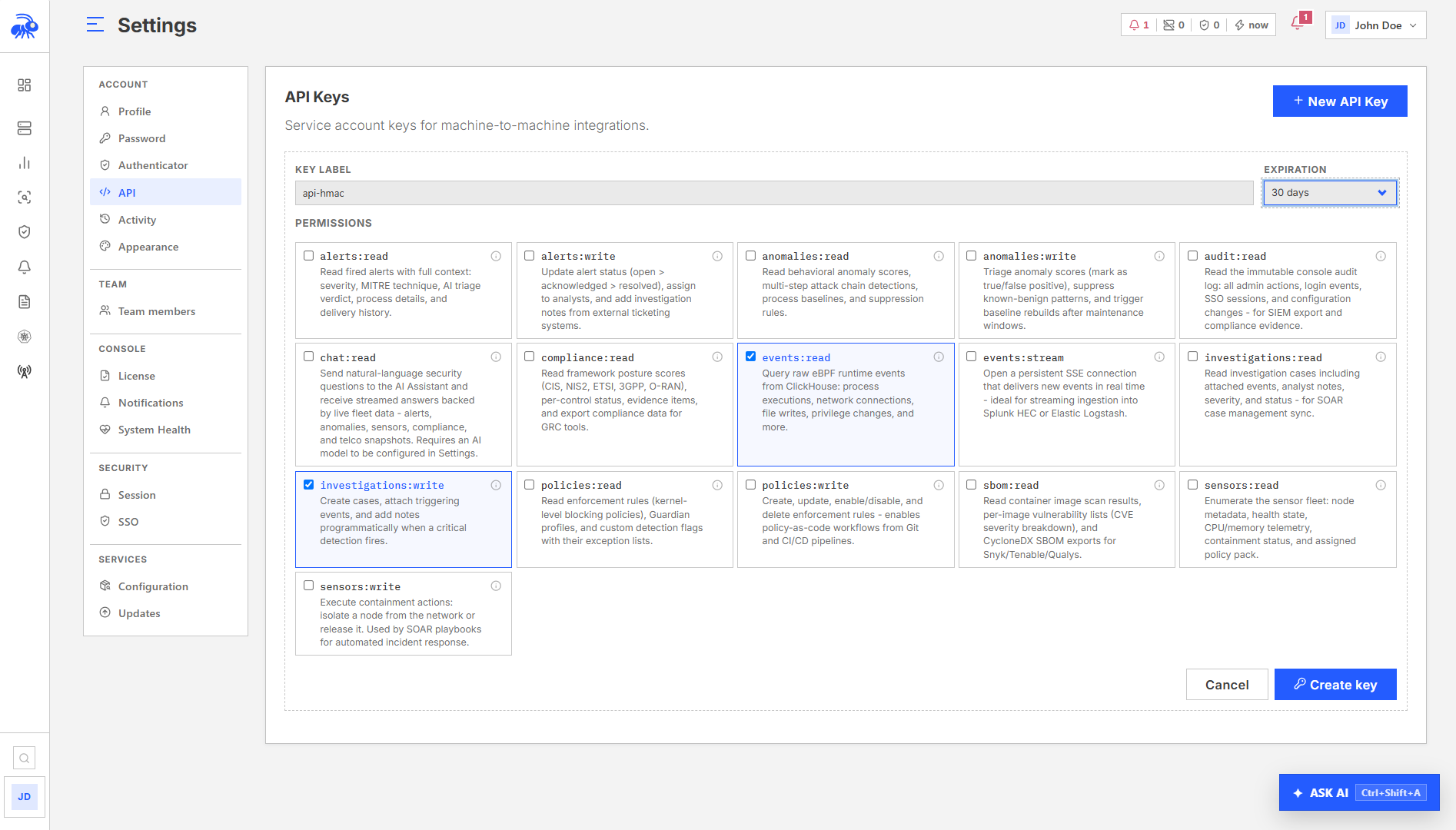
In Settings > API, click New API Key. Enter a Key label, choose Permissions and Expiration, then select Create key. Expiration choices are No expiry, 30 days, 90 days, 180 days, and 1 year.
Fields:
| Field | Required | Description |
|---|---|---|
label | Yes | Human-readable label (max 128 characters) |
scopes | Yes | Array of scope strings from the list above |
expires_days | No | Days until expiry; omit for no expiry |
The one-time secret material returned at creation looks like this:
{
  "key_id": "a3f8b2c1d4e5f609",
  "label": "CI event monitoring",
  "scopes": ["events:read", "alerts:read"],
  "hmac_secret": "7a3b4c5d6e7f8a9b0c1d2e3f4a5b6c7d8e9f0a1b2c3d4e5f6a7b8c9d0e1f2a3b",
  "hmac_note": "Sign every request with HMAC-SHA256. This secret will NOT be shown again.",
  "warning": "Store this secret securely. It will not be shown again."
}
The hmac_secret is returned only at creation time. It is stored encrypted in the Console database and is never retrievable again. Store it immediately in a secrets manager.
The key_id is the identifier used in the X-Telovix-Key-ID header on every signed request. The hmac_secret is the 32-byte secret (as a hex string) used for HMAC-SHA256 signing.
List API keys
The Settings > API page lists non-revoked keys, including expired keys, in pages of 25. Each entry includes:
| Field | Description |
|---|---|
key_id | 16-character hex key identifier |
label | Human-readable label |
scopes | Array of assigned scopes |
created_by | Email of the admin who created the key |
expires_at | Expiry timestamp (null if no expiry) |
last_used_at | Last time this key was used for a signed request (null if never used) |
revoked | Whether the key has been revoked (only non-revoked keys are returned) |
created_at | Creation timestamp |
Only non-revoked keys are returned. The HMAC secret is never included in list responses.
Revoke an API key
Use Revoke on the key row in Settings > API. Revocation is permanent. New signed requests are rejected immediately, and existing event streams close within 30 seconds. A revoked key cannot be reactivated.
Revoke unused keys when an integration is retired or its owner leaves. Disabling the creator's login does not revoke an independently issued API key.
Keys labelled Legacy bearer / Replacement required cannot authenticate. Create an HMAC key for the integration and revoke the legacy entry.
V2 API endpoints
API keys are used with the /api/v2/ endpoint family only.
Representative external endpoints by scope:
| Scope | Representative /api/v2/ endpoints |
|---|---|
sensors:read | /api/v2/sensors, /api/v2/sensors/{sensor_id}, /api/v2/sensors/{sensor_id}/metrics, /api/v2/sensors/{sensor_id}/health, /api/v2/sensors/{sensor_id}/energy, /api/v2/energy/fleet |
events:read, events:stream, analytics:read | /api/v2/events, /api/v2/events/stream |
alerts:read, alerts:write | /api/v2/alerts, /api/v2/alerts/{alert_id}, /api/v2/alerts/{alert_id}/notes |
anomalies:read, anomalies:write | /api/v2/anomalies/scores, /api/v2/anomalies/chains, /api/v2/anomalies/suppressions, /api/v2/anomalies/baselines |
compliance:read | /api/v2/compliance/posture, /api/v2/compliance/controls, /api/v2/compliance/controls/{control_id}/evidence, /api/v2/compliance/export |
policies:read, policies:write | /api/v2/policies/rules, /api/v2/policies/enforcement |
audit:read | /api/v2/audit |
sbom:read | /api/v2/sbom/scans, /api/v2/sbom/scans/{scan_id}, /api/v2/sbom/scans/{scan_id}/vulnerabilities, /api/v2/sbom/scans/{scan_id}/cyclonedx |
investigations:read, investigations:write | /api/v2/investigations, /api/v2/investigations/{case_id}, /api/v2/investigations/{case_id}/events, /api/v2/investigations/{case_id}/notes |
chat:read | /api/v2/chat |
When a v2 endpoint receives an API key request, it:
- Verifies all four HMAC headers are present.
- Checks the timestamp is within the 300-second window.
- Looks up the
key_idin the database (only non-revoked, non-expired keys match). - Decrypts the stored HMAC secret.
- Recomputes the expected signature and compares it using constant-time comparison.
- Rejects reused nonces for the same key and records the new nonce.
- Checks the required scope for the endpoint.
- Records recent usage. The last-used time can lag individual requests by up to a minute.
Key expiry
When expires_days is set on creation, the Console computes expires_at = now + expires_days. Requests using a key after expires_at are rejected with HTTP 401 and "invalid_key". Expired keys remain listed until revoked, so you can review and replace them.
Keys with no expires_days do not expire. They remain active until explicitly revoked.
Operational guidance
Secret is shown once: The hmac_secret is returned only in the creation response. There is no way to retrieve it afterward. If it is lost, revoke the key and create a new one.
One key per integration: Create a separate key for each external system (CI pipeline, SIEM pull, reporting job). This allows individual rotation and revocation without disrupting other integrations.
Minimum scopes: Assign only the scopes each integration needs. An event monitoring job only needs events:read. Use alerts:write to triage fired alerts and manage webhook destinations. Managing enforcement rules requires policies:write. Create notification rules through the Console with Operator or Admin access.
Timestamp synchronization: The server rejects requests with timestamp skew greater than 300 seconds. Ensure the machine generating signed requests has accurate NTP synchronization. Large skews typically indicate a misconfigured system clock rather than a network delay.
Fresh nonce per request: Every signed request must use a new X-Telovix-Nonce value. Reusing a nonce within the acceptance window causes HTTP 401 with "nonce_reused".
Key rotation: Create a new key before revoking the old one to avoid a window of unavailability. Update the dependent system with the new key_id and hmac_secret, verify it works, then revoke the old key.