

Runtime Blocks
Runtime Blocks lets authorized users terminate or deny matching runtime activity on selected sensors. Enforcement can interrupt workloads, node services, container runtimes, and telecom network functions, so every rule should be scoped, previewed, tested, and monitored as an operational change.
Open Respond > Runtime Blocks. Operator or Admin permission is required to create, enable, disable, or delete enforcement rules.
Detection and enforcement are different
- Runtime Detection observes matching activity and creates evidence.
- Runtime Blocks applies an enforcement action when the selected policy matches.
Use Runtime Detection first when you are not certain which processes will match. A detection event does not establish the impact of a later enforcement action.
Create a rule
- Open Respond > Runtime Blocks.
- Select a built-in protection or create a custom policy.
- Read What it does, Why it matters, and Watch out.
- Choose a scope: one sensor, a sensor group, or the fleet.
- Review the impact preview and telecom blast-radius warning, when present.
- Enter the requested confirmation text.
- Create the rule.
- Wait for its delivery state to become Active on the intended sensors.
Creating a rule does not prove it loaded successfully. Always review delivery state before relying on enforcement.
Scope rules narrowly
| Scope | Recommended use |
|---|---|
| Specific sensor | Initial canary and incident response on one node |
| Sensor group | Controlled rollout to similar workloads or a maintenance group |
| Fleet | Protection tested against workloads on every eligible sensor |
On telecom nodes, review which network functions are in scope. Terminating an AMF, SMF, UPF, gNodeB component, RIC component, or shared infrastructure process can affect sessions or network availability beyond the selected host.
Understand impact preview
Impact preview uses recent matching evidence to show which processes or sensors might have been affected. Interpret it carefully:
- A non-zero result identifies observed potential impact.
- A zero result means no matching evidence was available in the preview window.
- Unavailable or Unsupported means Telovix cannot calculate a reliable preview.
- No preview result guarantees that future workloads will be unaffected.
Review the exact action shown in the confirmation dialog. Many built-in protections terminate the matching process with SIGKILL; they do not return a normal permission-denied response.
Delivery states
| State | Meaning |
|---|---|
| Applying | The rule is enabled and awaiting confirmation from an in-scope sensor. |
| Active | At least one intended sensor confirmed that the rule is loaded, with no reported rejection. |
| Partially active | Some sensors confirmed the rule while others rejected it. |
| Rejected | In-scope sensors rejected or could not load the rule. |
| Disabled | The rule is retained but is not active. |
Open the delivery detail to see which sensors are active or rejected. A rule that remains Applying may be waiting for a sensor heartbeat, an offline sensor, or a policy result.
Exceptions
Exceptions exclude an exact executable from a rule. Add them only after confirming the legitimate process and the scope in which it should bypass enforcement.
An exception requires:
- an exact absolute executable path;
- an optional sensor scope;
- a reason for the audit trail.
Wildcard executable exceptions are not accepted. Avoid broad exceptions such as general-purpose shells or language runtimes unless the rule is intentionally designed around them.
Enforcement analytics
The Runtime Blocks overview separates:
- blocked operations, where the operation was denied;
- terminated processes, where the matching process received a termination action;
- affected sensors and processes;
- action history over the selected period.
An observed attempt is not the same as a confirmed block. Use the action outcome and sensor delivery state when reporting enforcement effectiveness.
Custom policies
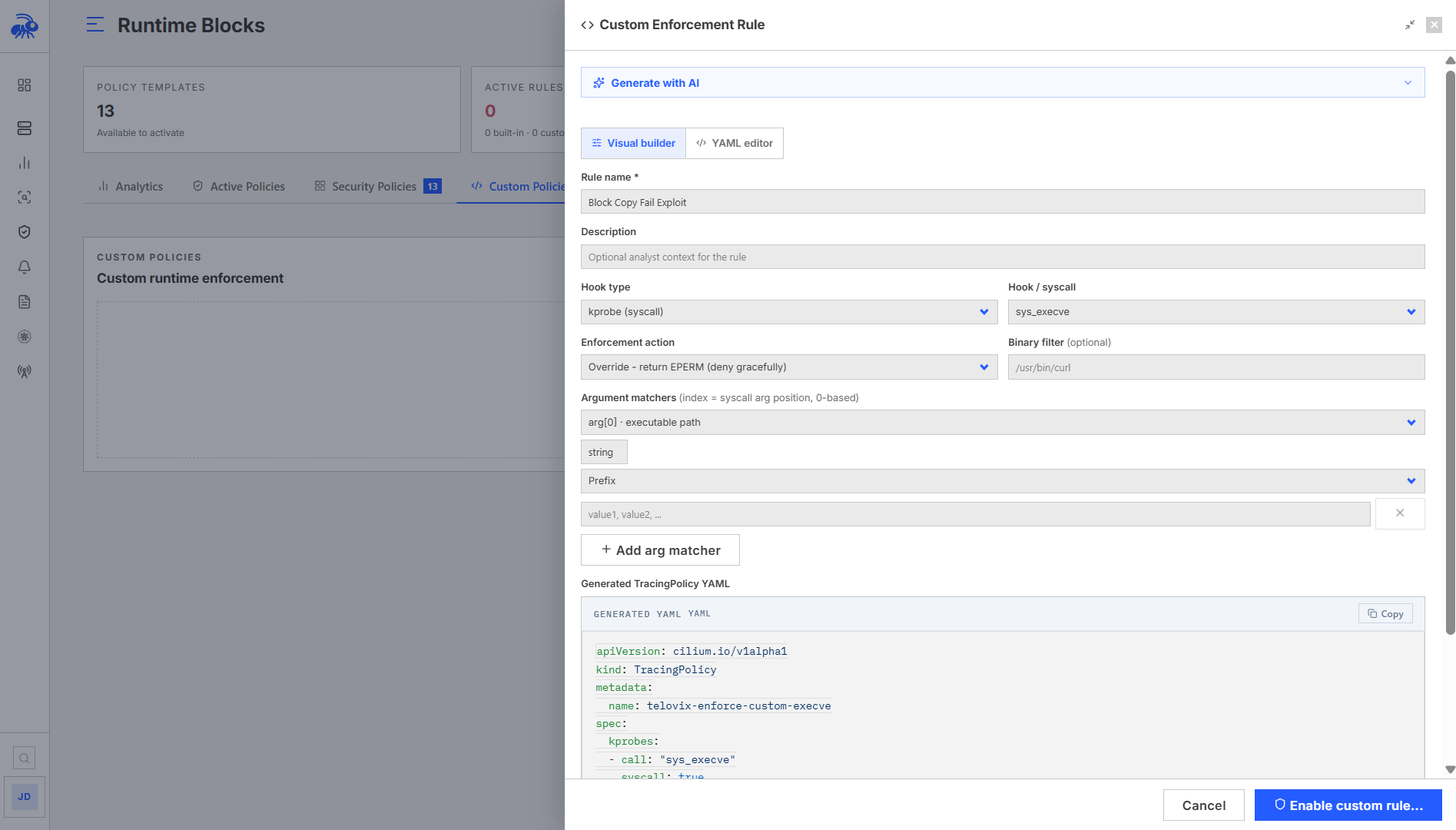
Custom policies are intended for experienced operators who understand the selected hook, arguments, selectors, and action. Telovix validates editable policy content before it can be saved and rejects unsupported fields, argument types, operators, selectors, or exceptions.
In Custom Policies, use Inspect policy to read the configured YAML with syntax highlighting. The policy content scrolls independently inside the expandable detail panel.
Use Edit policy to change the policy itself. Review its scope before saving: the change applies to all targets of that rule. After saving, check delivery details again; the previous active state does not confirm that every sensor has accepted the new version.
Generate with AI prepares a draft. Describe the behavior, intended targets, and action, then review the generated content and validation results before activation. AI generation does not replace testing against a representative workload.
You can also inspect a rule from Sensors > Fleet > sensor > Enforcement. Follow the editing action back to Runtime Blocks to modify it.
Before enabling a custom policy:
- Run it as a detection policy when possible.
- Verify the matched process and arguments in Live Feed or Investigate.
- Scope it to one non-critical sensor.
- Confirm it reaches Active.
- Generate a known test condition.
- Confirm the reported action matches the intended outcome.
Recommended rollout
- Observe the behavior with Runtime Detection.
- Review recent impact evidence.
- Apply the block to one non-critical sensor.
- Confirm Active delivery.
- Test the expected block and a known legitimate workload.
- Monitor runtime health, application health, and enforcement analytics.
- Expand to a sensor group.
- Use fleet scope only after the group rollout remains stable.
Do not introduce a new selector and an enforcement action on a critical network function in the same untested change.
Emergency rollback
If a rule disrupts production:
- Disable the rule immediately.
- Review the rollback result for each sensor.
- Confirm affected workloads recover.
- Keep the rule disabled while investigating the match evidence.
- Narrow the scope or add an exact exception only after identifying the cause.
The emergency rollback status can be partial when some sensors are unreachable. Verify each affected sensor instead of assuming a fleet-wide disable completed everywhere.
Validation checklist
- The rule scope contains only intended sensors.
- Impact preview is understood and not treated as a guarantee about future activity.
- The confirmation dialog describes the actual action.
- Every intended online sensor reports Active.
- Rejected sensors have a documented reason.
- A known malicious or test condition produces the expected action outcome.
- A known legitimate workload remains functional.
- Exceptions use exact executable paths and the narrowest scope.
- Audit Log records creation, changes, enablement, disablement, and deletion.
Troubleshooting
| Symptom | Check |
|---|---|
| Rule remains Applying | Confirm the target sensor is online and wait for its next policy exchange; then inspect delivery detail. |
| Rule is Rejected | Open the sensor result and correct the policy validation, compatibility, or capability error. |
| Rule is Partially active | Compare active and rejected sensors; do not treat the fleet as fully protected. |
| Matching activity appears but no confirmed block | Check action outcome, rule scope, enabled state, and sensor delivery confirmation. |
| Legitimate process is terminated | Disable the rule, inspect exact match evidence, then narrow scope or add an exact executable exception. |
| Custom policy cannot be saved | Correct the field, hook, argument, selector, action, or exception identified by validation. |