

Appearance
Runtime Blocks: Suppression Rules
Suppression rules mark specific event patterns as known-benign so they do not generate anomaly score alerts. When an event matches a suppression rule, its anomaly score record is stored with suppressed: true and hidden from the default anomaly view. The underlying event is still collected and stored in ClickHouse; suppression only affects the alerting layer.
Suppression rules do not prevent events from being recorded. They do not affect the alert inbox for alerts generated by alert rules (those have their own suppression window). They specifically affect the behavioral anomaly scoring engine.
Prerequisites
operatorrole- Anomaly scoring active on at least one sensor
What suppression affects
| Affected | Not affected |
|---|---|
Anomaly score records (marked suppressed: true, hidden by default) | Event storage in ClickHouse |
| Attack chain detection (chain matches can be individually suppressed) | Alert inbox (alert rules have their own suppression window) |
| The anomaly view's default display | Process tree, network view, fleet data |
Suppressed anomaly scores are not deleted. They remain visible by enabling the Show suppressed toggle in Behavioral Analytics.
Suppression rule fields
| Field | Description |
|---|---|
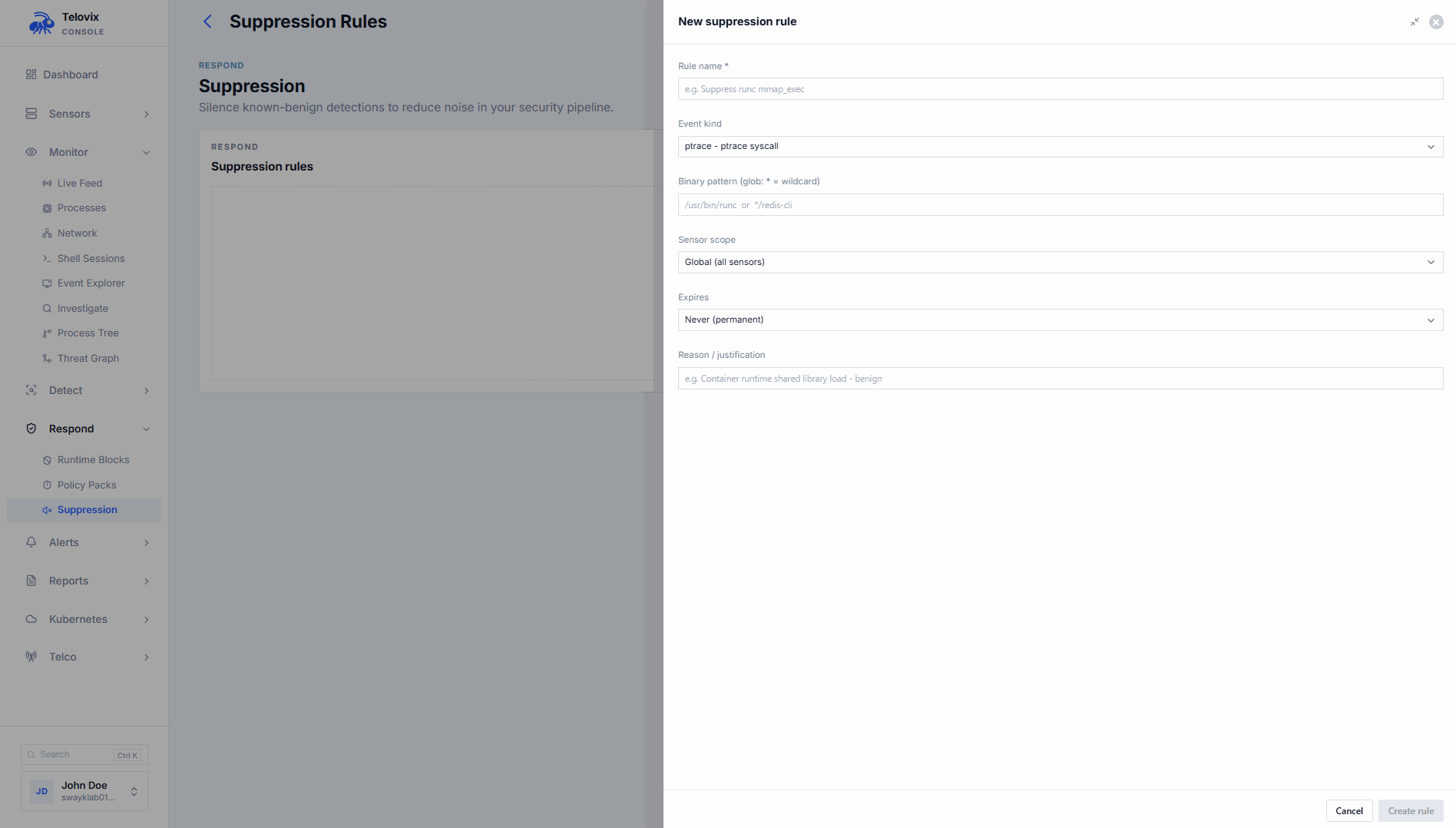
name | Human-readable label (required) |
event_kind | Suppress only this event kind. Empty or absent means all event kinds. |
process_executable_pattern | Glob pattern matched against the binary path. * matches any substring. Without *, it is an exact match. |
sensor_id | Scope to a specific sensor. Absent means all sensors. |
scope | Scope identifier. Defaults to all_sensors. |
reason | Explanation for the audit trail (strongly recommended) |
expires_at | ISO 8601 timestamp when the rule expires. Absent means it never expires. |
Rule IDs use the format supr_ followed by 16 hex characters.
Each rule summary also includes match_count_24h which shows how many events matched this suppression in the last 24 hours. A count of 0 may indicate the rule is no longer needed or the pattern has changed.
Glob pattern matching
The process_executable_pattern field uses simple glob matching:
*is the only wildcard character supported- Without
*, the pattern must be an exact match against the full binary path */ptp4lmatches any binary path ending in/ptp4l/usr/bin/open5gs-*matches any path starting with/usr/bin/open5gs-/usr/bin/chronydmatches only the exact path/usr/bin/chronyd
Creating a suppression rule
Requires operator role. sensor_owner role users must scope the rule to a specific sensor.
In the Console, go to Policies > Suppression Rules and click New Rule. Fill in the name, event kind, process pattern, reason, and optional expiry date. To scope the rule to a specific sensor, select the sensor from the sensor scope field.
Listing suppression rules
In the Console, go to Policies > Suppression Rules to see all active rules. Each rule shows its name, pattern, scope, reason, expiry, and match_count_24h.
Deleting a suppression rule
Requires operator role. In the Console, go to Policies > Suppression Rules, select the rule, and click Delete.
Deleting a suppression rule does not retroactively change anomaly records that were already marked suppressed. New events arriving after the deletion will be scored normally.
Viewing suppressed anomaly scores
By default Behavioral Analytics hides suppressed records. To audit active suppressions and verify they are matching as intended, go to Behavioral Analytics and enable the Show suppressed toggle.
Suppressing individual attack chains
Attack chain matches can be individually suppressed without creating a broader pattern-based suppression rule. In the Console, go to Anomalies > Attack Chains, select the chain match, and use the Suppress action. Provide a reason (e.g. false_positive) to record in the audit trail.
To un-suppress a specific chain match, use the Unsuppress action on the same chain match entry.
SOAR integration
For automated noise reduction via SOAR or scripted workflows, the Console exposes suppression management through its API. See the API reference for the anomalies:write scope endpoints. POST /api/v2/anomalies/suppressions accepts an optional sensor_id field: omit it for fleet-wide rules, or include it to scope the rule to a specific sensor.
Suppression review checklist
Review suppression rules when:
- A sensor upgrades and binary paths change
- A workload is replaced or retires (suppression for the old binary is no longer needed)
- A
match_count_24hof 0 persists for several days (rule may be stale) - An investigation reveals that a suppressed pattern contributed to a real incident
::: note A suppression should have a documented reason and an owner. Rules without expiry dates and without reasons become unexplained operational debt. Before creating a permanent suppression, consider whether the detection should be tuned in the policy pack or the anomaly baseline instead. :::