

Appearance
Audit Log
The Telovix Console audit log records every operator action that changes fleet state, security posture, or user identity. It covers the full lifecycle from user login through enforcement state changes, certificate renewals, and license imports. The audit log is the authoritative source for answering who changed what, when, and from where.
For security operations the audit log complements runtime event data. Runtime events describe what processes did; the audit log describes what operators did. Distinguishing the two prevents false escalations and helps responders understand whether a change in sensor behavior was intentional.
Audit log structure
Each audit record contains:
| Field | Description |
|---|---|
created_at | Timestamp of the action (RFC3339) |
action_type | Machine-readable event identifier (see reference below) |
outcome | success or failure |
actor_email | Email address of the user who performed the action (nullable for system actions) |
sensor_id | Sensor involved, if applicable (nullable) |
detail | Human-readable description of what happened |
client_ip | IP address of the operator's session at the time of the action (nullable) |
user_agent | Browser or client user agent (nullable) |
The actor_email field is null for system-initiated actions (such as auto_certificate_renewal_initiated) where no operator session is involved.
Querying the audit log
Recent audit entries
Requires operator role.
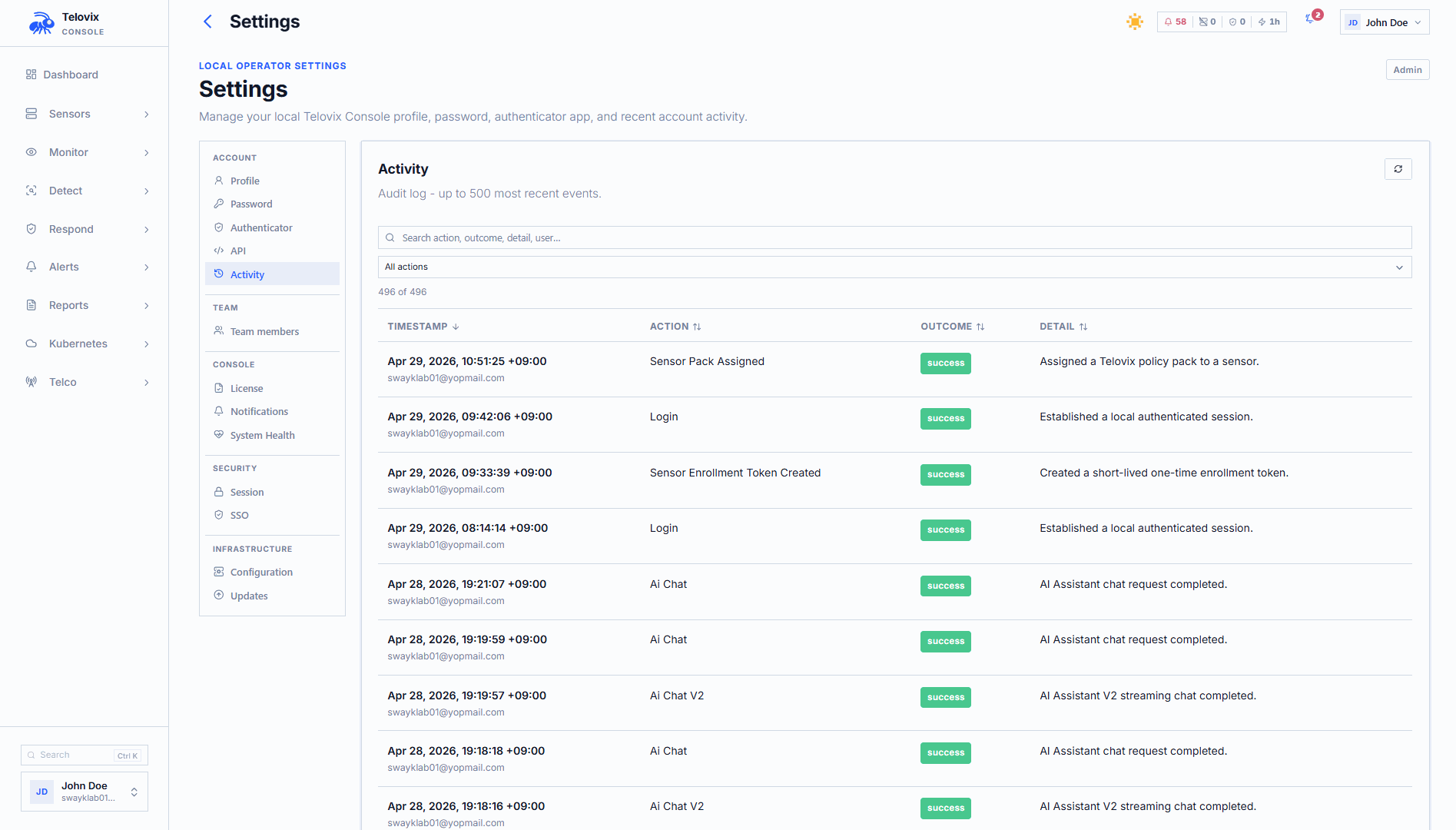
In the Console, navigate to Audit Log in the left sidebar. The list shows the most recent audit entries scoped to sensors the calling user can access. The default view shows 50 entries; you can increase the limit up to 5000.
Exporting audit entries
Requires operator role. Supports JSON and CSV formats.
In the Console, navigate to Audit Log, apply any desired filters, and click Export. Choose the format (JSON or CSV) and confirm. The export reflects the active filter state.
Export filter options:
| Parameter | Description |
|---|---|
from | Start of time window (RFC3339) |
until | End of time window (RFC3339) |
actor_email | Filter by actor email address |
sensor_id | Filter to actions involving a specific sensor |
outcome | success or failure |
action_family | Filter by event family (see families below) |
limit | Maximum entries (default 200, max 1000) |
format | json or csv (default json) |
The CSV export columns are: created_at, action_type, outcome, actor_email, sensor_id, detail, client_ip, user_agent.
Action families
The action_family export filter accepts these family names, each covering a logical group of action types:
| Family | Action types included |
|---|---|
user_management | login, logout, bootstrap_admin_created, console_user_created, console_user_role_updated, console_user_disabled, console_user_enabled |
sensor_lifecycle | sensor_enrollment_token_created, sensor_enrolled, sensor_disabled, sensor_revoked |
pack_assignment | sensor_pack_assigned, fleet_pack_assigned, group_pack_rollout_executed |
trust_renewal | sensor_manual_renewal_requested, sensor_certificate_renewed |
scope_management | sensor_group_created, sensor_group_updated, sensor_group_deleted, sensor_group_member_added, sensor_group_member_removed, console_user_group_scope_assigned, console_user_group_scope_removed |
license_management | license_import |
notification_management | (no action types currently mapped) |
Complete action type reference
All 51 action types recorded by the Console audit log:
Authentication and user identity
| Action type | Meaning |
|---|---|
login | Successful or failed login attempt |
logout | User logout |
password_change | User changed their password |
mfa_enabled | TOTP MFA enabled for a user |
mfa_disabled | TOTP MFA disabled for a user |
sso_login | Successful SSO authentication |
sso_login_failed | Failed SSO authentication attempt |
sso_user_created | New user account created via SSO |
sso_config_updated | SSO configuration changed |
User management
| Action type | Meaning |
|---|---|
console_user_created | New Console user account created |
console_user_role_updated | User role changed |
console_user_email_updated | User email address changed |
console_user_disabled | User account disabled |
console_user_enabled | User account re-enabled |
console_user_cluster_scope_updated | User's cluster scope changed |
console_user_group_scope_assigned | User assigned to a sensor group scope |
console_user_group_scope_removed | User removed from a sensor group scope |
invitation_created | User invitation created |
invitation_accepted | User invitation accepted (new account created) |
bootstrap_admin_created | First admin user created during Console setup |
Sensor lifecycle
| Action type | Meaning |
|---|---|
sensor_enrollment_token_created | Enrollment token created for a new sensor |
sensor_reenrollment_token_created | Re-enrollment token created for an existing sensor |
sensor_enrolled | Sensor completed enrollment |
sensor_disabled | Sensor temporarily disabled |
sensor_revoked | Sensor identity revoked |
sensor_deleted | Sensor record deleted |
sensor_decommissioned | Sensor marked as decommissioned |
sensor_tags_updated | Sensor tags changed |
sensor_contained | Sensor placed into containment mode |
sensor_released | Sensor released from containment |
Certificate trust
| Action type | Meaning |
|---|---|
sensor_certificate_renewed | Sensor certificate renewed (automated or manual) |
sensor_manual_renewal_requested | Operator triggered a manual renewal |
auto_certificate_renewal_initiated | Console initiated automated renewal (system action, no actor) |
Policy and enforcement
| Action type | Meaning |
|---|---|
sensor_pack_assigned | Policy pack assigned to a sensor |
fleet_pack_assigned | Policy pack assigned to the entire fleet |
group_pack_rollout_executed | Policy pack rollout executed for a sensor group |
sensor_enforcement_state_changed | Enforcement state changed (observe/enforce_ready/enforced) |
Sensor groups
| Action type | Meaning |
|---|---|
sensor_group_created | Sensor group created |
sensor_group_updated | Sensor group name or configuration updated |
sensor_group_deleted | Sensor group deleted |
sensor_group_member_added | Sensor added to a group |
sensor_group_member_removed | Sensor removed from a group |
Sensor views
| Action type | Meaning |
|---|---|
sensor_view_created | Custom fleet view created |
sensor_view_deleted | Custom fleet view deleted |
License
| Action type | Meaning |
|---|---|
license_import | License bundle imported into the Console |
Kubernetes
| Action type | Meaning |
|---|---|
k8s_cluster_deleted | Kubernetes cluster data removed |
k8s_cluster_enrollment_token_created | Kubernetes cluster enrollment token created |
AI assistant
| Action type | Meaning |
|---|---|
ai_chat | AI assistant conversation request |
ai_chat_v2 | AI assistant v2 conversation request |
chat_exported_to_investigation | AI chat session exported as an investigation |
Saved searches
| Action type | Meaning |
|---|---|
saved_search_settings_updated | Saved search configuration updated |
Compliance control coverage
The audit log provides evidence for several compliance controls:
| Control | Framework |
|---|---|
3GPP_4_2_6 | 3GPP TS 33.117: Security audit log completeness |
CIS_8_1, CIS_8_2 | CIS Controls v8: Audit log management |
The compliance framework evaluates the completeness and retention of audit records. Export audit data before investigation deadlines or compliance review windows. The Console does not automatically archive audit records to long-term storage; configure external retention if your compliance requirements exceed what the PostgreSQL database holds.
AI assistant tool
The AI assistant get_audit_log tool queries recent audit entries. In the Console, navigate to AI Assistant and ask a question such as "show recent enforcement state changes from the audit log". The assistant queries the audit log and returns a formatted summary.
Operational guidance
Export before investigations: Audit records are stored in the Console's PostgreSQL database. For incident investigations, export the relevant time window from the Audit Log page to a durable location immediately. Use the start and end time filters to scope the export tightly.
Filter failed logins: A spike in login events with outcome=failure from a specific client_ip indicates a brute-force attempt against the Console. In the Audit Log page, filter by Outcome = failure and Action Family = user_management to isolate authentication failures.
Correlate with enforcement changes: When unexpected enforcement behavior appears on a sensor, check the audit log for sensor_enforcement_state_changed and sensor_pack_assigned events near the same timestamp. An unintended pack assignment by an operator is often the explanation.
AI chat is audited: Every AI assistant conversation is logged with ai_chat or ai_chat_v2. This includes the actor, timestamp, and outcome. If AI assistant access is a compliance concern, review these entries as part of any audit.