

Appearance
Sensor: Kubernetes (Helm)
The Telovix Sensor deploys to Kubernetes as a DaemonSet via a Helm chart. Every Linux node in the cluster runs one sensor pod. This is the correct path for containerized workloads, O-Cloud platforms, and 5G Core clusters that use cluster lifecycle tooling.
When to use this path
| Scenario | Recommendation |
|---|---|
| General-purpose cluster | flavor=standard, cluster enrollment token |
| 5G Core or O-RAN cluster | flavor=telecom, cluster enrollment token, tag nodes by NF role |
| O-RAN vDU / vCU nodes | flavor=telecom, use the values-oran-vdu.yaml overlay |
| Subset of nodes only | Set nodeSelector or affinity to target specific nodes |
| Production fleet | Store the enrollment token in a Kubernetes Secret, not on the Helm command line |
Prerequisites
| Requirement | Notes |
|---|---|
| Kubernetes 1.24+ | Tested; earlier versions may work |
| Helm 3.10+ | |
| Nodes: Linux, kernel 5.4+, BTF enabled | See Requirements |
| Telovix Console reachable from nodes | Port 15483 (Telovix self-hosted default) outbound from nodes |
| Cluster enrollment token | See Generating the token |
Generating the token
For Kubernetes, use a cluster enrollment token, not a one-time bare-metal token. Cluster tokens:
- Are reusable by all nodes in the cluster
- Are valid for 365 days so the DaemonSet can re-enroll after node restarts
- Are bound to a cluster name; sensors from a different cluster name are rejected
Generate one from the Console:
- UI path: Sensors > Deploy Sensor > Kubernetes > enter cluster name > Generate Token
Store the token as a Kubernetes Secret before installing:
bash
kubectl create namespace telovix-system

kubectl create secret generic telovix-sensor-token \
  --namespace telovix-system \
  --from-literal=enrollmentToken=<your-cluster-token>
If kubectl create secret fails with AlreadyExists, the most common cause is a previous install that left the Secret behind; delete it first with kubectl delete secret telovix-sensor-token -n telovix-system and recreate it with the new token.
Quick install
bash
helm repo add telovix https://telovix.github.io/charts
helm repo update
If helm repo add fails, the most common cause is no outbound internet access from the installation host to telovix.github.io; verify DNS resolution and HTTPS connectivity before retrying.
bash
helm install telovix-sensor telovix/telovix-sensor \
  --namespace telovix-system \
  --set sensor.consoleUrl="https://<console-host>:15483" \
  --set sensor.existingSecret="telovix-sensor-token" \
  --set clusterName="prod-cluster"
For the telecom flavor:
bash
helm install telovix-sensor telovix/telovix-sensor \
  --namespace telovix-system \
  --set sensor.consoleUrl="https://<console-host>:15483" \
  --set sensor.existingSecret="telovix-sensor-token" \
  --set clusterName="ran-zone-a" \
  --set flavor=telecom \
  --set "sensor.tags[0]=site:oslo-dc1" \
  --set "sensor.tags[1]=domain:ran" \
  --set "sensor.tags[2]=plmn:242-01"
If helm install fails with Error: INSTALLATION FAILED, the most common cause is a missing or incorrectly named Secret; confirm telovix-sensor-token exists in the telovix-system namespace with kubectl get secret telovix-sensor-token -n telovix-system.
Verify pods are running:
bash
kubectl get pods -n telovix-system -o wideExpected output shows one pod per node, all in Running state:
NAME                      READY   STATUS    RESTARTS   AGE   NODE
telovix-sensor-2xk9p      1/1     Running   0          45s   node-01
telovix-sensor-4mv3q      1/1     Running   0          45s   node-02
telovix-sensor-r7bnf      1/1     Running   0          43s   node-03
If pods are in Init:0/1 or Pending, check the init container logs:
bash
kubectl logs -n telovix-system -l app.kubernetes.io/name=telovix-sensor -c bpf-initIf the init container logs show bpf filesystem not available or permission errors, the most common cause is the node kernel lacking BTF support or the pod not running in privileged mode; verify BTF with ls /sys/kernel/btf/vmlinux on the node.
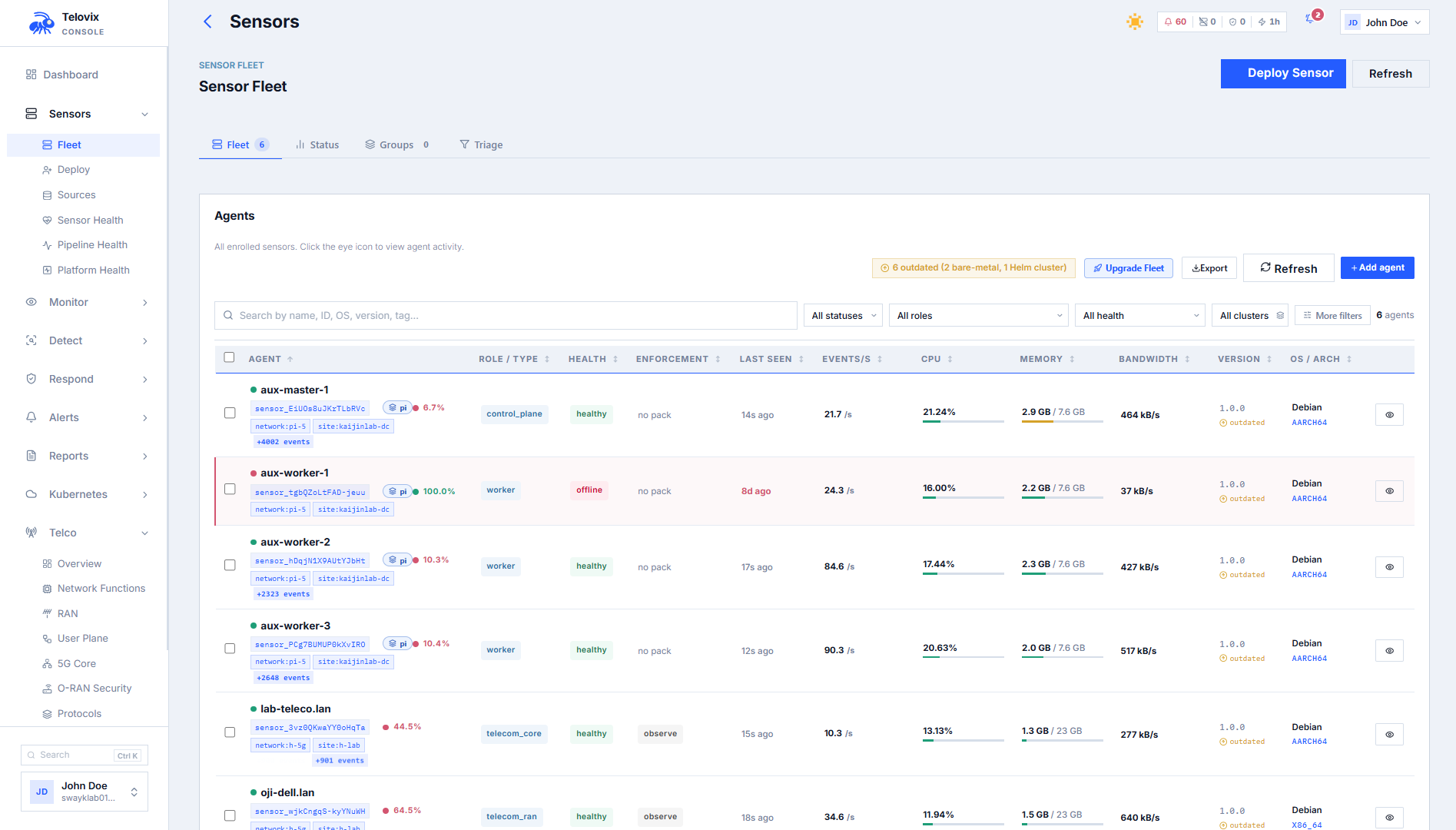
Verify enrollment in the Console:
Go to Sensors. Sensors appear within one heartbeat cycle (up to 15 seconds per node). Each sensor should show trust state healthy and a cluster name matching clusterName.
What the chart deploys
| Resource | Description |
|---|---|
DaemonSet | One sensor pod per node (tolerates all taints by default) |
ServiceAccount | telovix-sensor in the release namespace |
ClusterRole and ClusterRoleBinding | Read-only access to nodes, pods, namespaces, services, endpoints, deployments, daemonsets, replicasets, statefulsets, jobs, cronjobs |
ConfigMap | Console URL, cluster name, install ID |
Secret | Enrollment token (or reference to existingSecret) |
ImagePullSecret | Read-only registry deploy token (bundled) |
NetworkPolicy (optional) | Deny-all ingress, allow egress to DNS and Console port only |
PriorityClass (optional) | Prevents sensor pods from being evicted under node pressure |
Init container
Each pod runs an init container (bpf-init) before the main sensor container starts. It:
- Mounts or verifies the BPF filesystem at
/sys/fs/bpf - Removes stale BPF map pins left by a previous sensor run (
/sys/fs/bpf/telovix-sensorand/sys/fs/bpf/telovix) - Detects stale credentials: hashes the current enrollment token, compares it with the hash stored after the last successful enrollment (
/var/lib/telovix-sensor/.enrollment-token-hash). If the hash does not match (token rotated or Console wiped), it deletes the stale certificate files so the sensor re-enrolls cleanly with the new token
This makes token rotation idempotent: update the Secret, and the next pod restart automatically re-enrolls.
Security context
eBPF requires privileged mode. These settings are non-negotiable and are set by default:
yaml
securityContext:
  privileged: true
  runAsUser: 0
hostPID: true
hostNetwork: true
hostIPC: false
The sensor requires hostPID: true for host-wide process telemetry and hostNetwork: true for host-level network collection. Without privileged: true, the eBPF engine cannot attach kernel probes or access the BPF filesystem.
Host volumes
The sensor mounts these host paths read-only (except state and BPF):
| Mount | Host path | Access |
|---|---|---|
/proc | /proc | Read-only |
/sys | /sys | Read-only |
/sys/fs/bpf | /sys/fs/bpf | Read-write, Bidirectional propagation |
/var/lib/telovix-sensor | /var/lib/telovix-sensor | Read-write (certs, policies, spool) |
/host/run | /run | Read-only |
/host/etc | /etc | Read-only |
The state volume (/var/lib/telovix-sensor) is a hostPath volume. Certificate files and policy packs persist across pod restarts on the same node. If a pod moves to a different node, it re-enrolls fresh.
Key values reference
Required
| Value | Description |
|---|---|
sensor.consoleUrl | Console URL, e.g. https://console.example.com:15483 |
sensor.enrollmentToken or sensor.existingSecret | Enrollment token or name of a Secret containing it |
clusterName | Human-readable cluster name shown in the Console |
Common optional values
| Value | Default | Description |
|---|---|---|
flavor | standard | standard or telecom |
sensor.nodeRole | (auto) | Node role override. If empty, control-plane nodes get control_plane and workers get generic_linux |
sensor.tags | [] | List of key:value tags applied at enrollment |
sensor.nodeNameOverride | (uses spec.nodeName) | Override the node name shown in the Console |
sensor.bootstrapCaCertPath | (empty) | Path to Console CA cert for self-signed Console TLS |
tolerations | Tolerate all taints | Change to target specific node groups |
nodeSelector | (empty) | Target only matching nodes |
affinity | (empty) | Advanced node targeting |
resources.requests.cpu | 50m | |
resources.requests.memory | 128Mi | |
resources.limits.cpu | 500m | |
resources.limits.memory | 1Gi | |
updateStrategy | RollingUpdate, maxUnavailable=1 | |
terminationGracePeriodSeconds | 30 | Time to flush events on shutdown |
priorityClass.create | false | Create a PriorityClass to prevent eviction |
networkPolicy.enabled | false | Create deny-all-ingress, allow-egress-to-console NetworkPolicy |
networkPolicy.consolePort | 15484 | Console mTLS port for egress rule |
openshift.enabled | false | Adjusts SCCs for OpenShift |
extraEnv | [] | Additional environment variables (e.g. HTTP_PROXY) |
Sensor lifecycle
The pod's preStop hook calls /usr/local/bin/telovix-sensor --decommission before SIGTERM is sent. This notifies the Console to remove the sensor record cleanly. If the Console is unreachable, the pod still terminates after terminationGracePeriodSeconds.
Using a values file
For any non-trivial deployment, use a values file rather than --set flags:
yaml
# values-prod.yaml
sensor:
  consoleUrl: "https://console.example.com:15483"
  existingSecret: "telovix-sensor-token"
  nodeRole: "generic_linux"
  tags:
    - site:oslo-dc1
    - env:prod

clusterName: "oslo-prod-01"
flavor: standard

resources:
  requests:
    cpu: 50m
    memory: 128Mi
  limits:
    cpu: 500m
    memory: 1Gi

priorityClass:
  create: true
  name: telovix-sensor-priority
  value: 1000
  preemptionPolicy: PreemptLowerPriority
bash
helm install telovix-sensor telovix/telovix-sensor \
  --namespace telovix-system \
  -f values-prod.yaml
O-RAN vDU / vCU deployment
For O-RAN Distributed Unit and Central Unit nodes with DPDK-isolated cores, the chart includes a pre-built overlay file values-oran-vdu.yaml.
Key differences from the default values:
| Setting | Default | vDU overlay |
|---|---|---|
flavor | standard | telecom |
resources.requests.cpu | 50m | 25m |
resources.limits.cpu | 500m | 200m |
resources.requests.memory | 128Mi | 64Mi |
resources.limits.memory | 1Gi | 256Mi |
sensor.nodeRole | (empty) | o_du |
priorityClass.create | false | true (value: 1000000000) |
networkPolicy.enabled | false | true |
terminationGracePeriodSeconds | 30 | 60 |
::: note Do not set cpu limit > 500m on a vDU node. L1 radio processing has zero tolerance for CPU contention on non-isolated cores. :::
Usage:
bash
helm install telovix-sensor telovix/telovix-sensor \
  --namespace telovix-system \
  -f values-oran-vdu.yaml \
  --set sensor.consoleUrl="https://console.example.com:15483" \
  --set sensor.existingSecret="telovix-sensor-token"
The vDU overlay also enables networkPolicy.enabled: true, which creates a NetworkPolicy that denies all ingress and allows egress only to port 53 (DNS) and the Console mTLS port. This satisfies O-RAN WG11 §6.5 management plane access control requirements. Verify your CNI supports HostEndpoint enforcement (Cilium or Calico required for full effectiveness with hostNetwork: true).
For NUMA affinity and isolcpus guidance, see the node-affinity requiredDuringSchedulingIgnoredDuringExecution example in values-oran-vdu.yaml and adapt the label key to match your cluster's vDU labeling scheme.
Configure a proxy
If nodes reach the Console through an HTTP proxy:
yaml
extraEnv:
  - name: HTTP_PROXY
    value: "http://proxy.corp.example.com:8080"
  - name: HTTPS_PROXY
    value: "http://proxy.corp.example.com:8080"
  - name: NO_PROXY
    value: "localhost,127.0.0.1,.cluster.local"
Kubernetes admission webhook (optional)
The chart can deploy a Kubernetes admission webhook that calls the Telovix Console before pods are created. This enforces admission rules configured in the Console's Admission view.
yaml
admission:
  enabled: true
  consoleUrl: "https://console.example.com:15483"
  caBundle: "<base64-encoded-Console-CA-cert>"
  failurePolicy: "Ignore"   # Use "Fail" in production after validating
  excludeNamespaces:
    - kube-system
    - telovix-system
  timeoutSeconds: 10
Get the CA bundle from Settings > Console > CA Certificate in the Console and copy the base64-encoded value into caBundle.
Start with failurePolicy: Ignore during initial rollout. Switch to Fail after confirming the webhook responds correctly. Fail means that if the Console is unreachable, all pod creation in monitored namespaces is blocked.
Post-install verification
bash
# Check pods are running on every expected node
kubectl get pods -n telovix-system -o wide

# Check logs for a specific pod
kubectl logs -n telovix-system \
  -l app.kubernetes.io/name=telovix-sensor \
  --since=5m

# Check init container logs if pods fail to start
kubectl logs -n telovix-system \
  -l app.kubernetes.io/name=telovix-sensor \
  -c bpf-init
In the Console, go to Sensors. You should see one sensor per node within one heartbeat cycle (up to 15 seconds per sensor). Each sensor shows:
- Trust state:
healthy - Node name: matches the Kubernetes node name (or
sensor.nodeNameOverrideif set) - Cluster name: matches
clusterName - Flavor:
standardortelecom
Upgrade the chart
bash
helm repo update

helm upgrade telovix-sensor telovix/telovix-sensor \
  --namespace telovix-system \
  -f values-prod.yaml
If helm upgrade exits with Error: UPGRADE FAILED: release telovix-sensor not found, the most common cause is the release having been installed in a different namespace; check with helm list -A and include the correct --namespace flag.
The chart uses a RollingUpdate strategy with maxUnavailable: 1 by default. One node at a time goes through upgrade. On each node, the preStop hook calls --decommission before the old pod stops, and the new pod enrolls fresh using the cluster token.
Sensor identity (mTLS certificates) is preserved across upgrades because state lives on the hostPath volume at /var/lib/telovix-sensor. A new cert is only issued when the enrollment token changes.
Remove the sensor
bash
helm uninstall telovix-sensor --namespace telovix-systemThis removes all chart resources. The preStop hook on each pod calls --decommission before termination, which removes the sensor records from the Console. If the decommission calls fail, clean up orphaned sensors manually from Sensors.
The state directory /var/lib/telovix-sensor is a hostPath and is not removed by Helm. To clean it from each node:
bash
rm -rf /var/lib/telovix-sensorTroubleshooting
Init container fails: mount: bpf already mounted
The BPF filesystem is already mounted on this node. This is non-fatal; the init container detects the existing mount and continues without error. No action is needed.
Init container clears certs on every restart
The enrollment token stored in the Kubernetes Secret no longer matches the hash recorded after the last successful enrollment. This typically means the token was rotated without updating the Secret. Update the Secret with the current token and the init container will detect the match on the next restart and stop clearing certificates.
Pods stuck in Pending
The DaemonSet pods cannot be scheduled because a node taint is not tolerated by the chart. Check the tolerations section in your values file. The default chart tolerates all taints, so this usually means a custom tolerations override is too restrictive.
Pods scheduled but not in fleet
The pods are running but enrollment failed. Check kubectl logs -n telovix-system -l app.kubernetes.io/name=telovix-sensor -c bpf-init and kubectl logs -n telovix-system -l app.kubernetes.io/name=telovix-sensor for enrollment errors.
Sensors show stale
The Console is not reachable from the nodes. Verify that sensor.consoleUrl is correct and that nodes have outbound network access on port 15483. If a NetworkPolicy is active, confirm it permits egress to the Console port.
NodeLimitExceeded error in logs
The number of enrolled sensors has reached the license node limit. Check the active sensor count against the max_protected_nodes value shown in Console under Settings > License and either remove unused sensors or request a license upgrade from the Portal.
vDU pods evicted under load
The CPU or memory limits are too high relative to what L1 radio processing leaves available on non-isolated cores, causing the kubelet to evict the sensor pod under pressure. Apply the values-oran-vdu.yaml overlay, which reduces resource limits to values safe for vDU nodes.
NetworkPolicy blocks enrollment
The networkPolicy.consolePort value does not match the actual port your Console uses for the sensor mTLS listener. Verify networkPolicy.consolePort in your values file and correct it to match your Console's configured sensor port.
OpenShift SCCs blocking pod start
OpenShift Security Context Constraints are preventing the privileged pod from starting. Set openshift.enabled: true in your values file, which applies the required SCC adjustments for the Telovix Sensor on OpenShift.