

Appearance
Kubernetes Security
The Kubernetes Security view combines data from sensor heartbeat payloads with Kubernetes API cache state reported by sensors enrolled on Kubernetes nodes. It gives operators a pod-level view of workload inventory, security posture findings, container images, network policies, and ingresses, all correlated with the runtime eBPF events happening on the same nodes.
Data is sourced from sensors' Kubernetes API polling (every 30 seconds) and from eBPF events. Sensors must have Kubernetes mode enabled (set during sensor deployment) to enable Kubernetes API polling.
Pod inventory
In the Console, navigate to Kubernetes > Pods to see the pod inventory. Use the Cluster, Namespace, and Node filters in the filter bar to narrow results. The view supports up to 1,000 pods per page (default 500).
Filter parameters: cluster, namespace, node, limit (1–1000, default 500).
Each pod entry includes:
| Field | Description |
|---|---|
namespace | Kubernetes namespace |
pod_name, pod_uid | Pod identity |
workload_type, workload_name | Owning workload (Deployment, StatefulSet, DaemonSet) |
node_name, sensor_id | Node and sensor that reported the pod |
k8s_cluster_name | Cluster name from sensor configuration |
pod_phase | Kubernetes pod phase (Running, Pending, Succeeded, Failed) |
pod_conditions | Pod condition string |
pod_ip | Pod IP address |
labels | Pod labels as JSON string |
first_seen_at, last_seen_at | Observation window |
containers[] | Per-container details (name, image, tag, digest, init flag, restart count, pull policy) |
Pod security posture
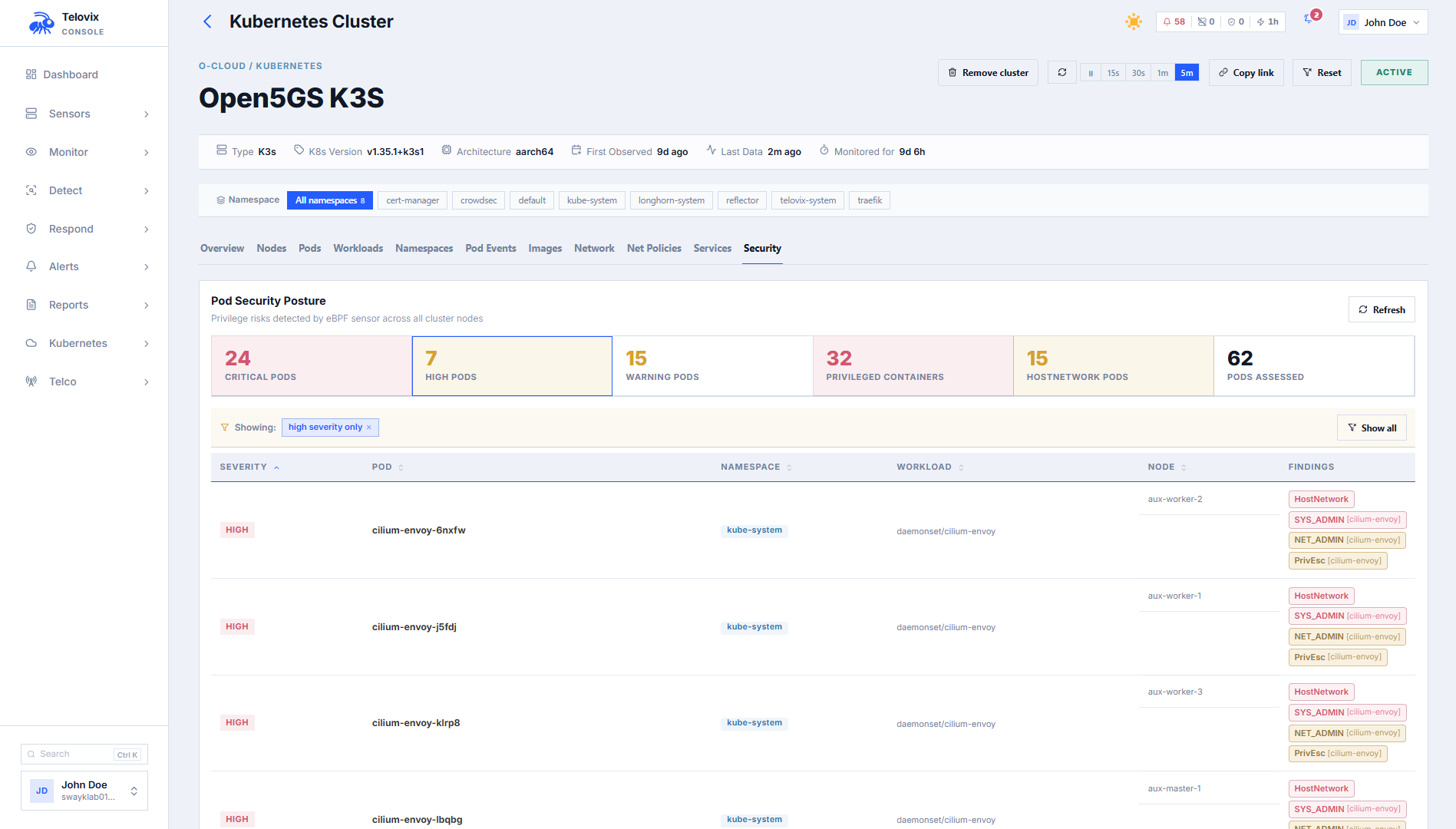
In the Console, navigate to Kubernetes > Posture and select the cluster from the dropdown. The view aggregates security findings from the sensor's pod posture reports for that cluster.
Posture findings by severity:
| Severity | Finding |
|---|---|
critical | Container runs as privileged: true (full host kernel access) |
high | hostNetwork: true, hostPID: true, hostIPC: true, or SYS_ADMIN capability |
warning | NET_ADMIN capability, allowPrivilegeEscalation: true, or container runs as UID 0 (root) |
The response includes total_pods_assessed, critical_pod_count, high_pod_count, warning_pod_count, privileged_container_count, host_network_pod_count, and risky_pods[] with per-pod finding details.
Reconstructed YAML
The Telovix Console reconstructs approximate YAML for Kubernetes objects from sensor-captured telemetry, providing resource context during investigations when direct cluster access is unavailable.
In the Console, navigate to Kubernetes > Pods (or Workloads, Services), open any resource row, and click View YAML. The Console reconstructs the YAML from sensor-captured telemetry and displays it in a read-only viewer.
Supported kinds: Pod, Service, Deployment, StatefulSet, DaemonSet.
::: note The reconstructed YAML is approximate. It is derived from data observed by sensors, not from the live Kubernetes API. Fields not captured by sensor telemetry will be absent or have default values. The response includes a note field explaining the reconstruction source. :::
Container images
In the Console, navigate to Kubernetes > Images to see all container images observed across the fleet. Use the Cluster filter to scope to a specific cluster. Click any image row to see all pods currently running that image.
Network policies
In the Console, navigate to Kubernetes > Network Policies and select the cluster and namespace. The view compares observed traffic against declared Kubernetes network policy rules.
Admission webhook
The Console can operate as a Kubernetes admission webhook. When enabled, the Kubernetes API server calls the Console before creating pods. The Console evaluates the pod spec against configured admission rules and returns an allow or deny decision.
See Sensor: Kubernetes (Helm) for how to enable and configure the admission webhook in the Helm chart.
Admission CA certificate
When configuring the MutatingWebhookConfiguration in Kubernetes, you need the Console's CA bundle. In the Console, navigate to Settings > Kubernetes Admission to find the CA certificate (displayed as a base64-encoded PEM). Copy this value into the caBundle field of your webhook configuration.
Admission rule types
Configure rule types from Settings > Kubernetes Admission > Rules:
| Rule type | What it enforces |
|---|---|
deny_privileged | Deny pods with privileged: true containers |
deny_host_network | Deny pods with hostNetwork: true |
deny_host_pid | Deny pods with hostPID: true |
deny_host_ipc | Deny pods with hostIPC: true |
deny_latest_tag | Deny containers using the latest tag or no tag |
require_resource_limits | Deny containers without explicit CPU and memory limits |
registry_allowlist | Deny containers whose image does not start with an allowed registry prefix (configured via config.allowed_registries[]) |
deny_root_user | Deny pods or containers running as UID 0 or with runAsNonRoot: false |
Admission rules support:
name: human-readable labeldescription: optional explanationtarget_namespaces: array of namespaces to apply the rule to (empty = all)target_clusters: array of cluster names to apply the rule to (empty = all)severity: alert severity when the rule fires (info,warning,critical)deny_message: custom message returned to the Kubernetes API server when admission is deniedenabled: toggle the rule without deleting it
Admission decisions
The Console stores decisions from the admission webhook for audit purposes. In the Console, navigate to Kubernetes > Admission > Decisions to review the full history of allow and deny decisions.
Removing a cluster
When you uninstall the sensor DaemonSet from a cluster, clean up the Console's stored cluster data. In the Console, navigate to Fleet > Clusters, find the cluster row, and click Remove Cluster. This permanently removes all sensor records whose k8s_cluster_name matches, plus all Kubernetes inventory (pods, images, network policies, services, workloads) for that cluster. Run this after helm uninstall telovix-sensor.
Limitations
- Pod inventory reflects what sensors reported in their most recent heartbeat. Pods that have been deleted since the last heartbeat may still appear until the next heartbeat refreshes the data.
- The reconstructed YAML endpoint produces approximate output from sensor-captured telemetry, not from the live Kubernetes API. Use it for incident context, not for cluster management.
- Pod security posture findings require sensors with Kubernetes mode enabled. Sensors on non-Kubernetes nodes report no pod posture data.
- The admission webhook requires the Console to be reachable from the Kubernetes API server on port
15483(Telovix self-hosted default). The webhook does not trigger on pods already running; it only evaluates new pod creation requests.