

Appearance
Webhook Notifications
The Telovix Console delivers alert and event notifications to external HTTP endpoints via webhooks. Webhooks are useful when another system (a SIEM, ticketing tool, pager, or custom automation) needs to receive Telovix alerts in near real-time without polling.
Prerequisites
adminrole to create webhooks- Destination URL reachable from the Console host
operatorrole to test webhooks
How delivery works
The Console posts to the configured URL using an HTTP POST with Content-Type: application/json. The request timeout is 10 seconds. If the endpoint returns a non-2xx status or times out, the delivery is recorded as failed and the failure is visible in the webhook's last_delivery_status and last_delivery_error fields.
The Console does not automatically retry failed deliveries with backoff. The delivery state is updated after each attempt and is visible in the Console UI.
Webhook types
The webhook_type field controls how the Console formats the payload for the destination. Supported values:
| Type | Use case |
|---|---|
generic | Standard JSON payload (default) |
slack | Slack Incoming Webhooks format |
discord | Discord webhook format |
teams | Microsoft Teams connector format |
pagerduty | PagerDuty Events API format |
opsgenie | Opsgenie Alert API format |
If webhook_type is omitted on creation, it defaults to generic.
Managing webhooks
In the Console, go to Settings > Integrations > Webhooks to create, update, test, enable, disable, or delete webhooks.
Create a webhook
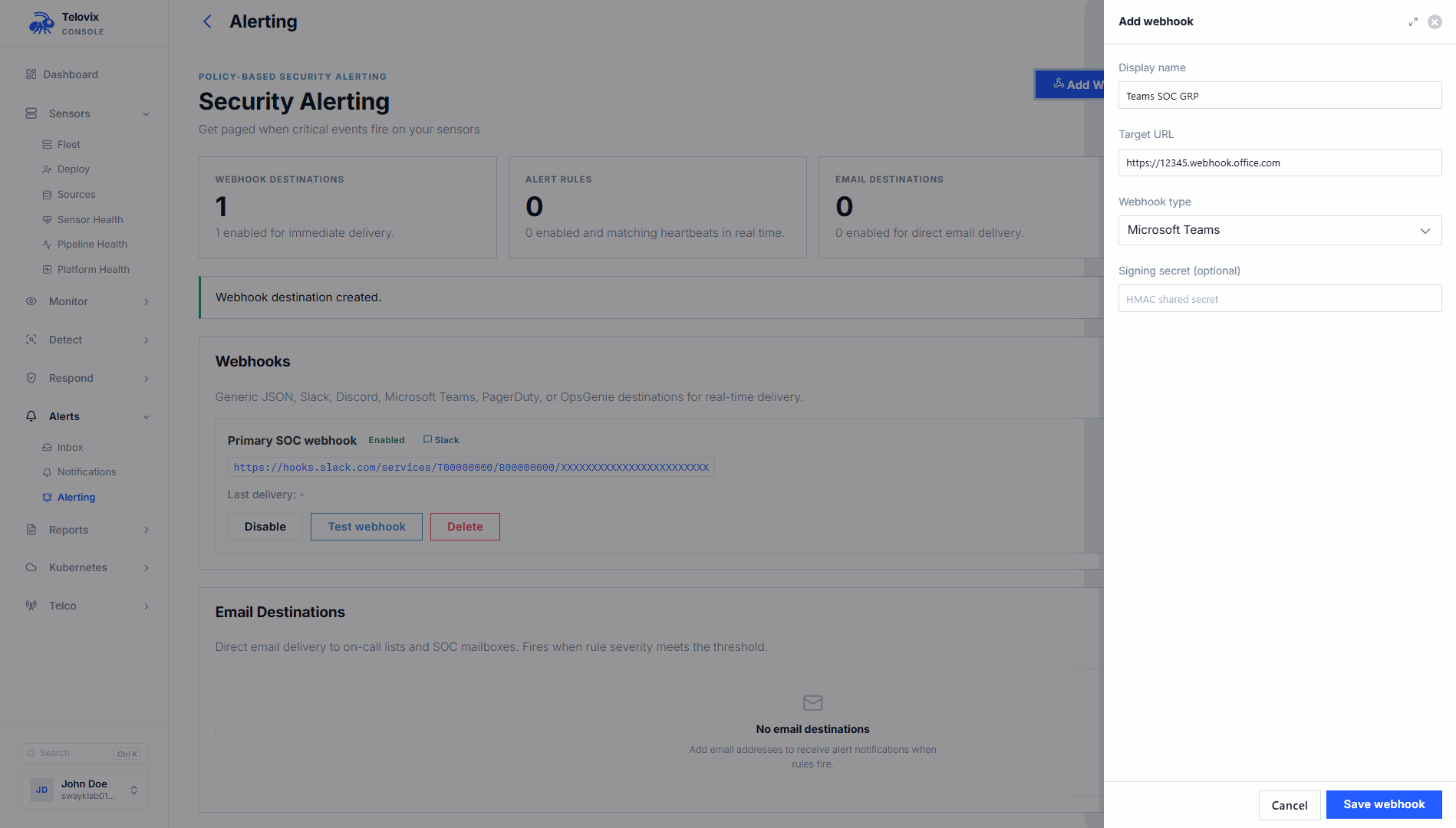
In the Console, go to Settings > Integrations > Webhooks and click Add Webhook. The Console presents these fields:
| Field | Required | Description |
|---|---|---|
display_name | Yes | Human-readable label |
target_url | Yes | Must start with http:// or https:// |
signing_secret | No | Secret used to sign payloads (see Signature verification below) |
webhook_type | No | One of generic, slack, discord, teams, pagerduty, opsgenie (default: generic) |
Update a webhook
In the Console, go to Settings > Integrations > Webhooks, click the webhook row, and edit the fields. Omitted fields retain their current values. To clear the signing secret, set it to blank. To keep the existing signing secret, leave the field empty.
Delete a webhook
In the Console, go to Settings > Integrations > Webhooks, click the webhook row, and select Delete.
Test a webhook
In the Console, go to Settings > Integrations > Webhooks, click the webhook row, and click Send Test. The Console sends a test delivery to the configured URL. The test payload is an AlertDeliveryPayload with alert_kind: "test_delivery" and severity: "info". If the webhook has a signing secret configured, the test delivery is signed the same way as live deliveries.
Payload format (generic type)
Alert deliveries use the AlertDeliveryPayload structure. All timestamps are RFC3339. Optional fields are omitted from the JSON if null.
| Field | Type | Always present | Description |
|---|---|---|---|
version | String | Yes | Payload schema version (currently "1") |
alert_kind | String | Yes | Alert category (e.g., high_severity_runtime_event, renewal_due, trust_revoked) |
severity | String | Yes | info, warning, high, or critical |
sensor_id | String | Yes | ID of the sensor that triggered the alert |
node_name | String | Yes | Display name of the sensor node |
trust_health | String | Yes | Current trust health of the sensor |
headline | String | Yes | Short human-readable summary |
detail | String | Yes | Longer description of the alert |
occurred_at | String (RFC3339) | Yes | When the event occurred |
delivered_at | String (RFC3339) | Yes | When the delivery was sent |
source | String | Yes | Internal source identifier |
pack_id | String | No | Policy pack ID if applicable |
event_kind | String | No | Runtime event kind that triggered the alert |
rule_name | String | No | Alert rule name if applicable |
message | String | No | Event message from the sensor |
process | String | No | Process binary path |
mitre_technique | String | No | MITRE ATT&CK technique ID |
mitre_tactic | String | No | MITRE ATT&CK tactic |
observed_at | String (RFC3339) | No | When the underlying event was observed |
declared_role | String | No | NF role of the sensor |
os_name | String | No | Operating system name |
os_version | String | No | Operating system version |
architecture | String | No | CPU architecture |
kernel_version | String | No | Kernel version |
tags | Array | No | Sensor tags (omitted if empty) |
is_contained | Boolean | Yes | Whether the sensor is in containment |
group_ids | Array | No | Sensor group IDs (omitted if empty) |
related_event_count | Integer | No | Count of related events |
k8s_namespace | String | No | Kubernetes namespace |
pod_name | String | No | Kubernetes pod name |
workload_type | String | No | Kubernetes workload type |
workload_name | String | No | Kubernetes workload name |
container_id | String | No | Container ID |
parent_executable | String | No | Parent process executable |
ancestors | String | No | Process ancestry chain (JSON string) |
telecom_protocol_family | String | No | Telecom protocol family |
telecom_interface_context | String | No | Telecom interface context |
telecom_transport_context | String | No | Telecom transport context |
alert_inbox_url | String | Yes | Direct URL to the alert in the Console |
Example generic payload
The alert_inbox_url in these examples uses port 15483 (Telovix self-hosted default).
json
{
  "version": "1",
  "alert_kind": "high_severity_runtime_event",
  "severity": "high",
  "sensor_id": "sensor_3Tz8mQkLpNvXa1Yw",
  "node_name": "upf-prod-01",
  "trust_health": "healthy",
  "headline": "Privilege escalation detected on UPF node",
  "detail": "Process /opt/open5gs/bin/upf called setuid to root",
  "occurred_at": "2026-04-26T14:22:00Z",
  "delivered_at": "2026-04-26T14:22:01Z",
  "source": "alert_rule",
  "event_kind": "privilege_change",
  "process": "/opt/open5gs/bin/upf",
  "declared_role": "upf",
  "tags": ["site:oslo", "plmn:242-01"],
  "is_contained": false,
  "alert_inbox_url": "https://console.example.com:15483/alerts"
}
Saved search match payload
When a saved search alert fires, the payload format is different:
json
{
  "version": "1",
  "alert_kind": "saved_search_match",
  "search_id": "<id>",
  "search_name": "UPF network anomalies",
  "match_count": 15,
  "window_secs": 3600,
  "threshold": 10,
  "triggered_at": "2026-04-26T14:22:00Z",
  "event_search_url": "https://console.example.com:15483/events?saved_search_id=<id>"
}
Signature verification
When a signing_secret is configured, every delivery includes an X-Telovix-Signature header:
X-Telovix-Signature: sha256=<hex-encoded-hmac-sha256>The signature is computed as HMAC-SHA256 over the raw JSON request body bytes using the signing secret.
Verifying the signature (Node.js example)
js
import { createHmac } from "crypto";

function verifyTelovixSignature(body, secret, signatureHeader) {
  const expected = "sha256=" + createHmac("sha256", secret)
    .update(body)
    .digest("hex");
  return signatureHeader === expected;
}

app.post("/telovix", (req, res) => {
  const sig = req.headers["x-telovix-signature"];
  const raw = JSON.stringify(req.body); // use raw body buffer in production
  if (!verifyTelovixSignature(raw, process.env.WEBHOOK_SECRET, sig)) {
    return res.status(401).send("invalid signature");
  }
  // process the payload
  res.sendStatus(204);
});
Use the raw request body bytes (before any JSON parsing) for signature verification. Parsing and re-serializing may change whitespace and invalidate the HMAC.
Enabling and disabling webhooks
In the Console, go to Settings > Integrations > Webhooks and toggle the enabled state on the webhook row. Disabled webhooks receive no deliveries.
Connecting webhooks to alert rules
Alert rules can route to a webhook destination. When creating or updating an alert rule, set the response_action to "webhook" or "webhook_and_investigate" and provide the response_webhook_id. The "webhook_and_investigate" action delivers the alert to the webhook and simultaneously creates an investigation in the Console.
Valid response_action values: none, webhook, investigate, webhook_and_investigate.
Monitoring delivery health
The webhook row in Settings > Integrations > Webhooks shows delivery health fields:
| Field | Description |
|---|---|
last_delivery_at | Timestamp of the most recent delivery attempt |
last_delivery_status | HTTP status code returned by the endpoint |
last_delivery_error | Error message if the delivery failed (null on success) |
If last_delivery_error is set and last_delivery_status indicates failure, investigate the endpoint's availability and response behavior. Use the test button to re-verify connectivity after resolving the issue.
Operational guidance
Use raw body bytes for signature verification: Many web frameworks parse JSON before the route handler runs and do not expose the original bytes. Buffer the raw body before parsing if you need to verify signatures. The HMAC is computed over the exact bytes sent by the Console, not over a re-serialized JSON object.
Return 2xx quickly: The Console webhook delivery timeout is 10 seconds. If downstream processing takes longer, acknowledge the delivery immediately (HTTP 204) and process the payload asynchronously. Slow endpoints will accumulate delivery failures.
Use the test button before wiring to paging: Always test a new webhook using the test button before connecting it to alert rules that trigger paging. Verify both that the payload arrives and that the signature validates correctly.
Slack and Teams types: When using slack or teams webhook types, the Console formats the payload according to the platform's Incoming Webhook specification. If you configure a signing secret, the Console still applies the X-Telovix-Signature header in the same way.