

Standard vs Telecom Flavor
Telovix ships two sensor flavors. The standard flavor covers Linux and Kubernetes runtime security. The telecom flavor builds on standard and adds protocol-aware monitoring for 5G Core and Open RAN workloads. Both use the same enrollment process, the same mTLS trust model, and the same heartbeat delivery path.
The flavor is embedded in the binary. You select it at install time, and it cannot be changed without reinstalling. Sensor identity (mTLS certificates, sensor ID, existing policy assignments) is preserved across a flavor change.
Choosing a flavor
| Scenario | Flavor |
|---|---|
| Standard Linux servers, VMs, edge nodes | standard |
| Kubernetes worker nodes (no 5G workloads) | standard |
| Kubernetes nodes running 5G Core NFs (AMF, SMF, UPF) | telecom |
| O-RAN nodes (O-DU, O-CU-CP, O-CU-UP, gNB) | telecom |
| Near-RT RIC | telecom |
| Mixed node where you are unsure | telecom with observe-only pack |
The telecom flavor adds work in proportion to the protocol traffic it observes. Measure Standard and Telecom on a representative canary before a broad rollout; workload traffic, enabled capture, protocol mix, and policies determine active resource use. See Requirements for deployment starting points.
Capability comparison
Core eBPF collection (both flavors)
| Capability | Standard | Telecom |
|---|---|---|
Process execution (kprobe sys_execve) | Yes | Yes |
| Process fork and exit | Yes | Yes |
File open and write (kprobe openat, sys_write) | Yes | Yes |
Privilege change (sys_setuid, sys_setgid) | Yes | Yes |
Namespace creation (sys_clone with CLONE_NEW*) | Yes | Yes |
Kernel module load (sys_init_module) | Yes | Yes |
| ptrace attach | Yes | Yes |
| Network connections (TCP outbound, inbound, listen) | Yes | Yes |
| DNS queries and resolution correlation | Yes | Yes |
| TCP flow tracking (duration, state, bytes) | Yes | Yes |
| BPF map access detection | Yes | Yes |
| File Integrity Monitoring (SHA-256 baseline) | Yes | Yes |
| Process ancestor chain enrichment | Yes | Yes |
| Kubernetes workload context (pod, namespace, workload) | Yes | Yes |
| Container image software inventory and vulnerability scanning | Yes | Yes |
| Behavioral anomaly scoring (per-binary baselines) | Yes | Yes |
| Kernel guard monitoring | Yes | Yes |
Telecom-specific collection (telecom flavor only)
| Capability | Protocols / Standards | Notes |
|---|---|---|
| NF role detection | 5G SA, EPC, O-RAN | Protocol, process, workload, service, and configured identity evidence with confidence scoring |
| NG-RAN signaling | NGAP, NRPPa, NAS 5G | Procedure, outcome, positioning metadata, nested NAS security metadata, and decode status |
| E-UTRAN signaling | S1AP, NAS EPS | S1 procedure, session-relevant information elements, nested NAS EPS metadata, and decode status |
| PFCP session tracking | 3GPP TS 29.244, port 8805 UDP | Session creation latency, session churn, SEID collision, dropped packets |
| GTP-U tunnel monitoring | 3GPP TS 29.281, port 2152 UDP | TEID reuse, invalid TEID, encapsulation loop, payload size anomaly |
| GTP control and charging | GTPv2-C, GTPv1-C, GTP Prime | Control-session, PDP-context, and charging-transfer metadata where observed |
| F1AP monitoring | 3GPP TS 38.473, port 38472 SCTP | DU registration, RRC context setup, setup failures |
| E1AP monitoring | 3GPP TS 38.463, port 38462 SCTP | CU-UP registration, bearer setup latency |
| XnAP monitoring | 3GPP TS 38.423, SCTP | Inter-gNB handover, neighbor registration |
| E2 monitoring | E2AP, E2SM-RC, E2SM-KPM, E2SM-CCC | RIC procedures, targeted service-model container formats, and decode status |
| Fronthaul metadata | eCPRI | Message type, size, series, sequence, event metadata, and decode status; IQ payload is not retained |
| O1 interface monitoring | O-RAN Alliance, NETCONF | Management peers plus bounded RPC, reply, notification, operation, datastore, and error metadata |
| O2 interface monitoring | O-RAN Alliance, REST/OpenAPI | Resource exhaustion, orphaned containers |
| xApp monitoring | O-RAN WG3 | Rogue RIC peer detection, non-standard E2 port |
| SCTP association tracking | RFC 9260 | Association churn, chunk loss rate, RTT, abort reason codes |
| SIGTRAN and SS7 signaling | M3UA, SCCP, TCAP, MAP, CAP | Transport lifecycle, routing, transaction, application-context, and supported operation metadata |
| Diameter peer monitoring | RFC 6733, 3GPP TS 29.230, port 3868 | CER failure, auth success rate, accounting data loss |
| RADIUS monitoring | RFC 2865/2866, ports 1812/1813 UDP | Access-reject rate spikes, accounting data loss |
| SIP session monitoring | RFC 3261, port 5060 UDP/TCP | Invitation rejection rate, session count anomaly |
| SBI / HTTP2 monitoring | 3GPP TS 29.501, port 7777 / 29500-29599 | NF-to-NF API calls, unexpected service call matrix |
| Media metadata | RTP, RTCP | Header, endpoint, stream, sequence, timing, and decode metadata; media payload is not retained |
| Gateway control | H.248, MGCP | Transaction, command, endpoint, response, and decode metadata |
| Interworking and location | SGsAP, LCS-AP | Message or procedure, association, endpoint, and decode metadata |
| IKEv2 | RFC 7296 | IPsec tunnel setup monitoring |
| TLS uprobe (OpenSSL, GnuTLS, Go TLS, BoringSSL) | 3GPP TS 29.501 mTLS requirements | SBI plaintext detection, TLS posture per NF |
| NF SLO monitoring | 3GPP TS 22.261 | Per-role availability targets (5-nines for AMF/UPF/SMF) |
| NF privilege escalation detection | Unexpected setuid to root or cross-NF boundary | |
| Rogue process detection | NF spawning unexpected child binaries | |
| Configuration drift detection | NF config file changes outside maintenance windows | |
| Timing analysis | NF response latency distribution per interface | |
| Visibility gap detection | AF_XDP, VFIO, DPDK bypass detection on GTP-U port | |
| Telecom anomaly scoring | Protocol violations, SLO breaches, integrity issues combined into risk score (0-100) |
Console UI differences
The Telovix Console vertical (selected during initial setup) must match the sensor flavor in use. A standard Console with telecom sensors will store telecom heartbeat data in the database but will not surface it in the UI.
| Console section | standard vertical | telecom vertical |
|---|---|---|
| Telco navigation section | Hidden | Visible |
| 5G Core NF inventory view | Not shown | Active |
| NGAP KPI charts | Not shown | Active |
| O-RAN interface status | Not shown | Active |
| SLO dashboard | Not shown | Active |
| Supported telecom protocol analytics and evidence | Not shown | Active |
| Telecom compliance frameworks (3GPP TS 33.117, O-RAN WG11) | Not shown | Available in reports |
| AI assistant telecom context | Not available | Telecom inventory, signaling, O-RAN, and SLO context |
NF role detection
The Telecom Sensor combines several observed signals when identifying a network-function role:
- protocol and service-port activity;
- process and executable identity;
- container image and Kubernetes workload identity;
- SBI, SCTP, PFCP, GTP, O-RAN, and configured service evidence.
Auto-detection uses a confidence score combining all signals. The Console can promote a generic_linux declared role to telecom_core or telecom_ran based on detected evidence, but it never downgrades an already-set telecom role.
Roles detected:
| Category | Roles |
|---|---|
| 5G Core | AMF, SMF, UPF, NRF, UDM, UDR, PCF, AUSF, NEF, CHF, BSF, NSSF, NWDAF, SMSF, SEPP, LMF, GMLC, AF |
| 4G/EPC | MME, SGW, PGW, HSS, PCRF |
| RAN | gNB (variants), eNB, E2Node, Near-RT RIC, xApp |
| Infrastructure | OAM endpoint, PTP/SyncE node, Diameter node, RADIUS server, IMS node, SIGTRAN gateway |
SLO monitoring
The Telecom Sensor reports network-function availability, interface latency, resource, timing, and protocol-health evidence to the SLO workspace. Configure targets that match the operator's service objectives and deployment role. Treat a short or incomplete observation window as partial evidence rather than a proven SLO breach.
Visibility gaps
If a GTP-U user plane uses a kernel-bypass mechanism such as AF_XDP, VFIO, SR-IOV, or DPDK, normal kernel packet observation may not see that traffic. Telovix reports detected capture gaps in the Console so operators can distinguish missing visibility from an absence of traffic.
Control-plane coverage must be evaluated separately. A kernel-bypass user plane does not by itself hide ordinary kernel-visible control-plane traffic, but closed appliances, unsupported encryption paths, separate namespaces, interfaces, or bypass paths can still limit observation.
Installing with the correct flavor
Sensors > Deploy generates the install command with the selected flavor, node role, node name, and enrollment token. Review the values before running the command on the target node.
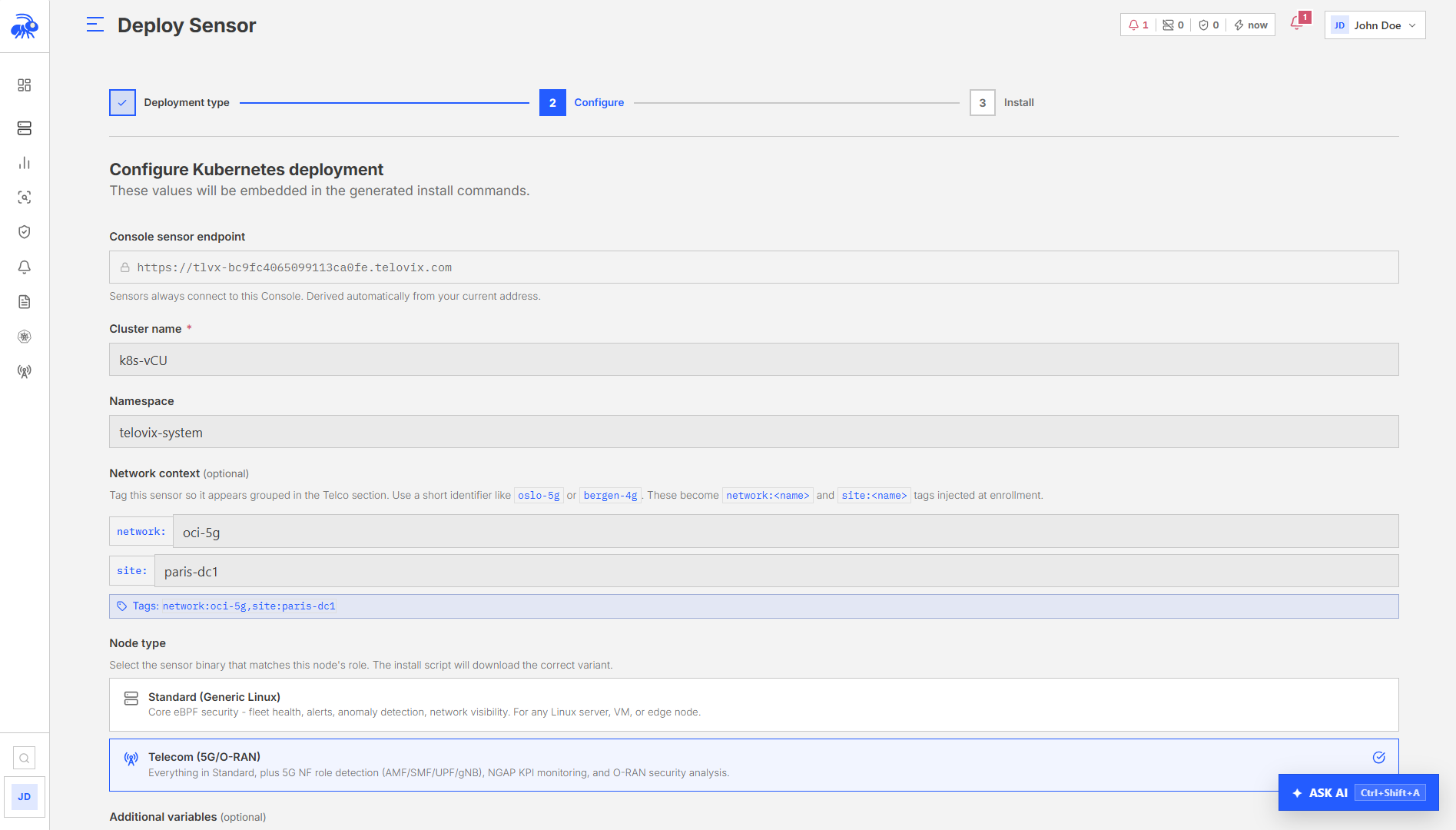
For Kubernetes, set flavor: telecom in the Helm values file. This deploys the registry.gitlab.com/telovix/sensor:<version>-telecom image tag instead of <version>.