

O-RAN WG11 Evidence
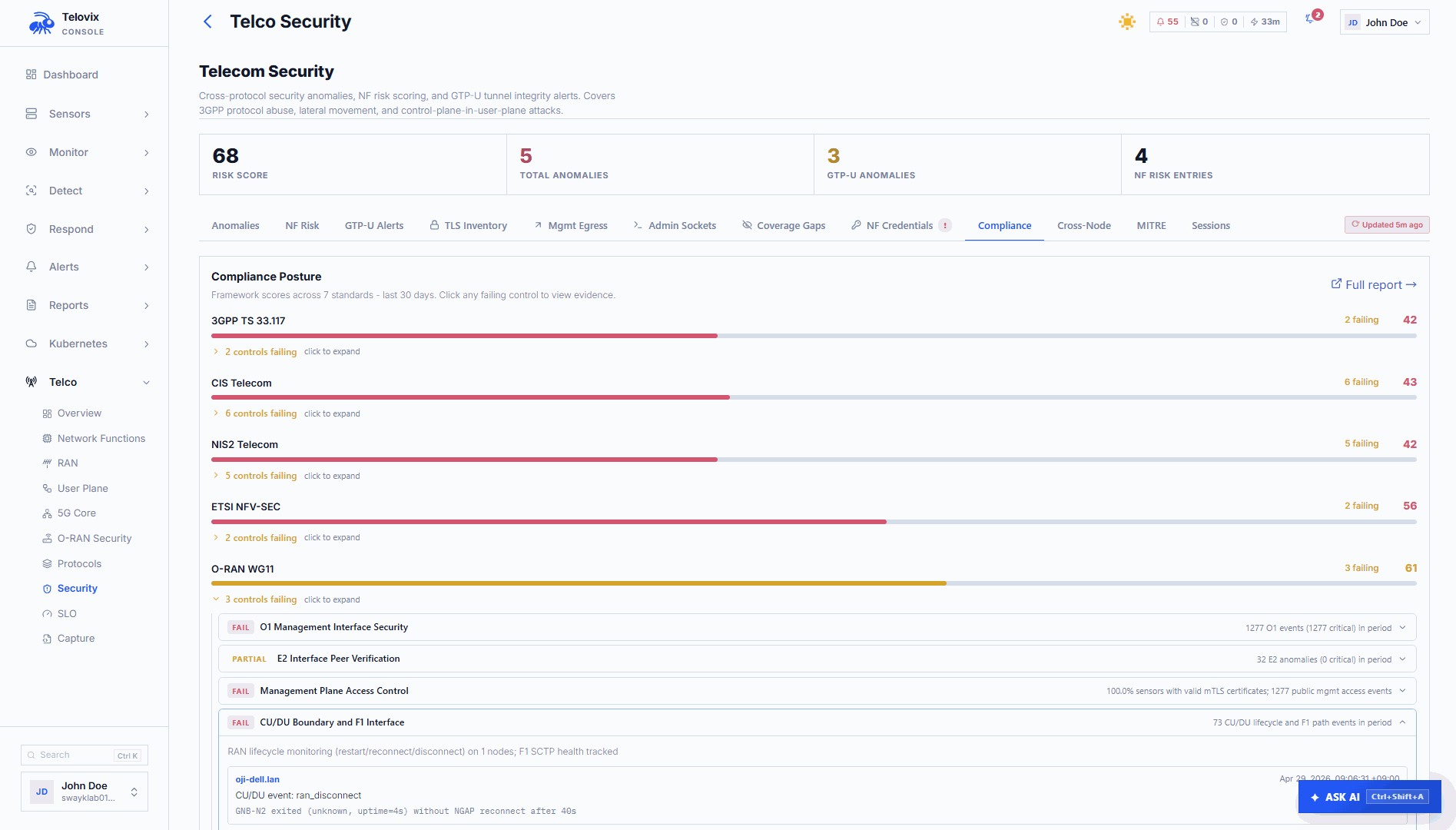
Use the O-RAN WG11 report to review supporting runtime evidence for your Open RAN security assessment. It is not an O-RAN certification or a complete test of the specification.
The report requires the telecom Console mode and relevant telecom sensor coverage.
Open the report
- Open Reports > Compliance Reports > Control Evidence.
- Select O-RAN WG11.
- Choose a reporting period and confirm the scope.
- Open a control to read its evidence and required follow-up.
Evidence areas
Telovix groups the available evidence into nine checks:
| Area | What to review |
|---|---|
| O1 Management Interface Security | Observed management activity and related findings. |
| O2 Infrastructure Interface Security | Infrastructure API activity and resource-management findings. |
| E2 Interface Peer Verification | Observed E2 peers and related process identity. |
| O-Cloud Time Synchronization | Available timing-service evidence and gaps. |
| Management Plane Access Control | Management processes, access activity, and findings. |
| CU/DU Boundary and F1 Interface | Observed RAN component and interface context. |
| xApp/rApp API Security | Application activity and related API findings. |
| KPM Measurement Data Integrity | Available measurement-related evidence and findings. |
| F1/E1 Interface Boundary Enforcement | Relevant boundary observations and protection evidence. |
These are Telovix evidence groupings. Their presence does not mean the complete corresponding requirement has been assessed.
Interpret a result
Use the same status meanings as Compliance Reports:
- Evidence check met means the Telovix check has supporting evidence.
- Partial evidence requires further assessment.
- Needs review identifies evidence that warrants investigation.
- Not assessed means the required evidence is missing or cannot establish a result.
No detected violation is not proof that an interface is authorized, encrypted, or correctly configured. A running time-synchronization process alone does not prove timing accuracy.
Follow the evidence
- Open Telco > Network > O-RAN for observed O-RAN relationships and protocol activity.
- Open Telco > Network > RAN for RAN interface and signaling evidence.
- Use API Security to inspect captured request and response content.
- Use Investigate for the corresponding recorded events and process context.
Check observation times and the selected network before comparing these views. Current topology and historical events describe different periods.
Prepare a review bundle
Open Reports > Compliance Reports > Evidence Bundles to generate and download the appropriate report snapshot. Review the included framework and evidence before sharing it.
Combine Telovix evidence with your configuration records, access reviews, organizational procedures, and test results. Ask the assessor which format and supporting material they require; a downloaded bundle is not automatically a certification submission.
Validate a detection
A controlled threat exercise can confirm that a selected detection produces evidence in your deployment. It does not validate an entire O-RAN requirement.
Agree on the test scope and maintenance window, record the expected result, run the exercise, and attach the resulting alert or investigation to your review. See Threat Exercises.