Skip to content

Runtime Blocks: Security Policies (Templates)

Telovix security policies define exactly what each sensor observes, alerts on, and enforces at the kernel level. This page covers the two policy mechanisms (policy packs and enforcement rules) and how they compose at runtime.

Prerequisites

  • operator role
  • Sensor already enrolled and visible in fleet

Policy packs

Policy packs are curated collections of TracingPolicy YAML files signed with the Console's Ed25519 key and distributed to sensors via the heartbeat response. Each pack targets specific node roles and covers relevant process execution paths, network connection patterns, and security-sensitive behaviors for that role.

Available packs

All packs at version 0.1.0. Two packs (o-du-process-guard and o-cloud-integrity-guard) are enforcement-capable.

O-DU packs (target role: o_du)

Pack IDKindWhat it observes
o-du-baseline-observeobserveO-DU service execution paths and outbound connectivity for DU-aligned components
o-du-fronthaul-observeobserveO-DU fronthaul interface activity
o-du-process-guardguardExecution from mutable staging paths on O-DU hosts; can enforce after operator advancement

O-CU packs (target role: o_cu)

Pack IDKindWhat it observes
o-cu-baseline-observeobserveO-CU baseline process and connectivity
o-cu-core-signaling-observeobserveNGAP, F1-AP, and E1-AP signaling handler execution and interface connections
o-cu-ims-session-observeobserveIMS session activity on O-CU nodes
o-cu-signaling-observeobserveO-CU signaling interface coverage

O-Cloud packs (target role: o_cloud)

Pack IDKindWhat it observes
o-cloud-baseline-observeobserveO-Cloud host baseline coverage
o-cloud-core-observeobserveGTP user-plane handler, PFCP session control, and 5G core control-plane function processes
o-cloud-integrity-guardguardExecution from mutable staging paths; can enforce after operator advancement
o-cloud-interconnect-observeobserveO-Cloud interconnect and transport coverage
o-cloud-runtime-drift-observeobserveRuntime drift: unexpected privileged launches, novel connections, integrity indicators

General

Pack IDKindSupportTarget roles
generic-linux-observeobservedevelopmentgeneric_linux, o_du, o_cu

The generic-linux-observe pack has support_level: development. It is intended for lab use only.

Assigning a pack

In the Console, go to Sensors, select a sensor, and click Assign Pack. Choose the pack ID and version from the catalog.

For fleet-wide assignment, go to Sensors > Fleet Actions > Assign Pack, select the target sensors, pack, and version, then confirm.

To view all available packs and their provenance state, go to Policies > Policy Packs.

Enforcement-capable packs

Packs with pack_kind: guard support the three-state enforcement ladder (observe - enforce_ready - enforced). The two guard packs in the current release block execution from /tmp, /var/tmp, /dev/shm, and /run/telovix-staging when advanced to enforced state. The enforcement_summary field in the manifest describes exactly what will be blocked.

See Enforcement Mode for how to advance the enforcement state.


Policy signing

Every pack policy file is signed by the Console before delivery. The Console loads or generates an Ed25519 signing key at startup (defaults to policy-signing.ed25519 in the working directory; the path is configurable in Console Settings).

The signature covers the message:

telovix-policy-v1:{policy_name}\n{yaml_content}

The public key is distributed to sensors at enrollment as policy-signing.pub. Sensors verify each policy before loading it. Invalid signatures cause the policy to be rejected. A .yaml.sig sidecar file stores the base64-encoded signature alongside each .yaml file.


Enforcement rules (templates)

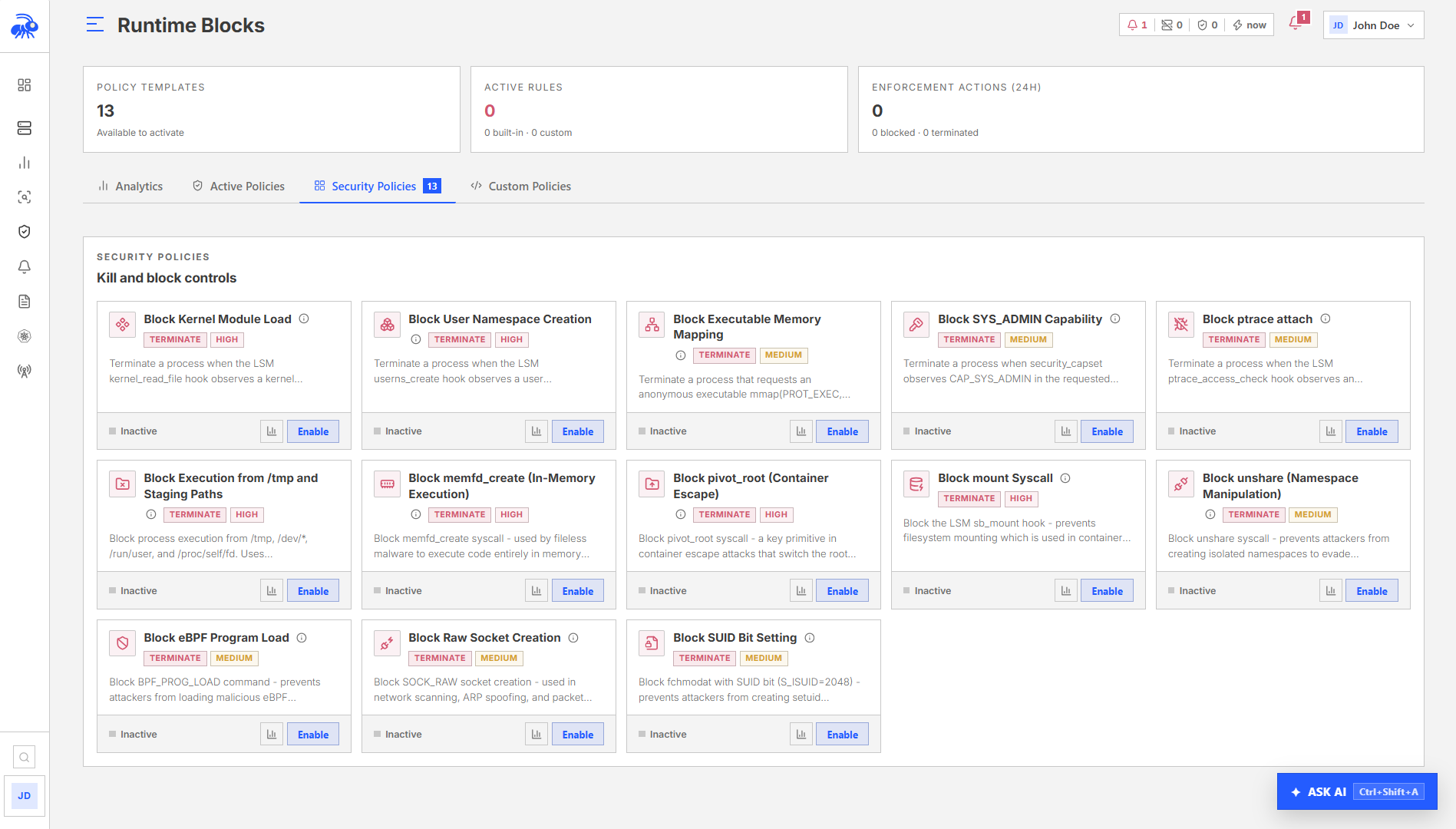
Enforcement rules are individually targeted controls based on built-in templates. They work independently of policy packs. See Enforcement Mode for the full list of templates and how to create them.

The built-in templates cover:

TemplateWhat it blocks
block-kmod-loadKernel module loading
block-user-namespaceUser namespace creation
block-raw-socketsRaw socket creation
block-capset-sysadminSYS_ADMIN capability assignment
kill-ptrace-attachptrace attach (kills the attaching process)
block-execve-tmpExecution from /tmp, /dev, /run/user, /proc/self/fd
block-memfd-creatememfd_create anonymous memory file creation
block-pivot-rootpivot_root system calls
block-mount-syscallmount system calls
block-unshareunshare system calls
block-bpf-loadBPF program loading
block-socket-rawRaw socket creation (alternate path)
block-chmod-suidSetuid bit via chmod
customOperator-supplied TracingPolicy YAML

Before creating an enforcement rule, use the impact preview panel in the Console to see historical activity. In the Console, go to Policies > Enforcement > New Rule, select the template, and the preview loads automatically. The preview queries the last 7 days of event history and returns affected binaries and event counts.


Suppression rules

Suppression rules silence specific event patterns without modifying the detection policy. They are evaluated at the anomaly scoring level and prevent scores from generating alerts for matching events.

Fields

FieldDescription
nameHuman-readable label (required)
event_kindSuppress this event kind only (empty = all kinds)
process_executable_patternGlob pattern matching the process binary path
sensor_idScope to a specific sensor (empty = all sensors)
scopeall_sensors (default) or a scope identifier
reasonExplanation for audit trail
expires_atISO 8601 timestamp when the rule expires (empty = never)

Suppression rule IDs use the format supr_ followed by 16 hex characters.

Creating a suppression rule

Requires operator role. In the Console, go to Policies > Suppression Rules and click New Rule. Fill in the event kind, process pattern, reason, and optional expiry date.

Listing and deleting suppression rules

In the Console, go to Policies > Suppression Rules to view all active rules. Select a rule and click Delete to remove it.

Suppression rules do not remove past alerts. They only prevent new alerts from firing for matching events while the rule is active.


Policy delivery and convergence

After a pack is assigned or an enforcement rule is created:

  1. The Console includes the updated policy state in the next heartbeat response for the affected sensor(s).
  2. The sensor receives the policy at the next heartbeat cycle (up to 15 seconds).
  3. The sensor verifies the Ed25519 signature on each policy file before applying it.
  4. The policy is written to compiled-policies/ on the sensor host and applied to the eBPF engine.
  5. The heartbeat's active_enforcement_policies and active_custom_policies fields reflect what is currently loaded.

A sensor that has not heartbeated recently may not have converged on the latest policy. Check the sensor's last heartbeat timestamp and trust state before assuming a policy is active.


  1. Start with the baseline observe pack for the target node role. Let it collect events in observe mode for at least 14 days before reviewing anomaly scores.
  2. Review the enforcement verification readiness panel on the sensor (Sensors > [sensor] > Enforcement) before advancing any pack to enforce_ready.
  3. Add suppression rules for known-good patterns that are generating noise. Include an expiry date unless the suppression is permanent.
  4. Use enforcement rule impact preview before creating a blocking rule. Even a block-execve-tmp rule will affect processes like build systems that legitimately execute from /tmp.
  5. Document policy changes in the audit trail. Enforcement and suppression changes are audited; link them to the investigation or maintenance window that justified them.

Further reading

Released under the Telovix Commercial License.