

Webhook Notifications
Webhook destinations deliver Telovix alerts to collaboration, paging, case-management, or custom automation systems. Telovix formats each request for the selected destination and records the delivery result.
Open Alerts > Alert Rules, then use the webhook destination section. An Admin creates, edits, or disables destinations. Operators and Admins can test destinations and manage alert rules.
Supported destinations
| Type | Required configuration |
|---|---|
| Generic JSON | HTTP or HTTPS endpoint; optional HMAC signing secret |
| Slack | Slack Incoming Webhook URL |
| Discord | Discord webhook URL |
| Microsoft Teams | Teams workflow or incoming webhook URL that accepts an Adaptive Card message |
| PagerDuty | Events API v2 URL and integration routing key |
| OpsGenie | Alert API URL and API key |
| TheHive | TheHive base URL and API token |
Create and test a destination
- Select Add Webhook.
- Enter a display name.
- Choose the webhook type.
- Enter the target URL.
- Enter the destination credential or optional generic signing secret.
- Save the webhook.
- Send a test.
- Confirm the destination received and rendered the test correctly.
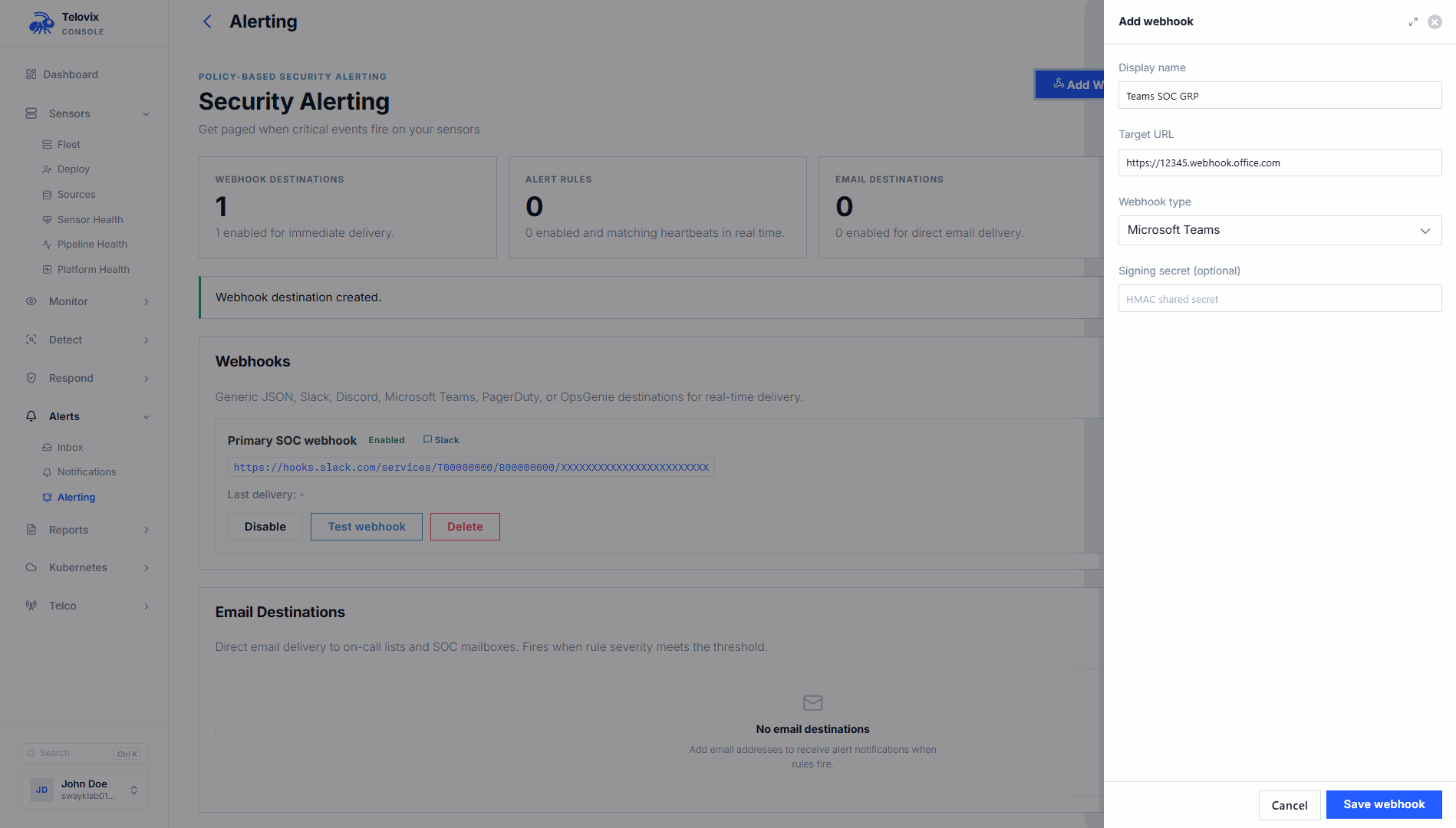
The target must be reachable from the Console. For private destinations, configure DNS, routing, firewall rules, and certificate trust before testing.
Provider guidance
Generic JSON
Use Generic JSON for custom automation or an unsupported platform. Configure an optional signing secret when the receiver can verify request authenticity.
When a secret is configured, Telovix sends:
X-Telovix-Signature: sha256=<hex-encoded HMAC-SHA256>Verify the signature against the exact raw request body before parsing JSON.
Slack
Create a Slack Incoming Webhook for the intended channel and paste its URL into Telovix. The alert is delivered as a Slack message with headline, details, sensor, severity, and time.
Discord
Create a webhook for the intended Discord channel. Telovix sends a Discord-compatible message and embed.
Microsoft Teams
Use a Teams workflow or webhook URL that accepts incoming Adaptive Card messages. Test the destination because Teams tenant policy can restrict incoming webhooks.
PagerDuty
Use the PagerDuty Events API v2 endpoint and enter the integration key as the Routing Key. Telovix maps severity and sends a stable deduplication key so related delivery attempts do not create arbitrary duplicate identities.
OpsGenie
Use the OpsGenie Alert API endpoint:
https://api.opsgenie.com/v2/alertsFor an EU account, use the EU endpoint. Enter an API key permitted to create alerts. Telovix maps severity to OpsGenie priority.
TheHive
Enter the TheHive instance base URL, such as:
https://thehive.example.com:9000Enter an API token permitted to create alerts. Telovix uses the TheHive alert endpoint automatically; entering either the base URL or the complete alert endpoint is accepted.
Connect a webhook to an alert rule
- Open Alerts > Alert Rules.
- Create or edit a rule.
- Select scope, event kind, severity, and optional Kubernetes or workload conditions.
- Select at least one webhook destination.
- Configure the suppression window to prevent repetitive notifications.
- Preview the rule against recent evidence.
- Save and enable the rule.
A successful test does not enable routing by itself. Select the destination in an enabled alert rule, custom detection response, or saved-search alert as appropriate.
Generic payload
Generic webhook payloads include the available alert context:
- schema version and alert kind;
- severity, headline, and detail;
- event and delivery times;
- sensor and node identity;
- event kind, process, parent, and ancestry when available;
- Kubernetes workload context when available;
- telecom protocol and interface context when available;
- a link back to the Telovix alert.
Optional fields are omitted when the source evidence does not contain them. For the complete field list, see Webhook Payload Reference.
Monitor delivery
Open the delivery log to review status, destination, time, and error details. Filter the log by delivery status or webhook when troubleshooting.
| Result | Meaning |
|---|---|
| Success | The destination accepted the request. |
| Failed | The destination returned an error, the connection failed, or the request timed out. |
Temporary connection failures, throttling, and server errors are retried automatically, up to eight attempts. Other provider rejections may require a configuration correction before delivery can succeed. Check Delivery Log for the reported result.
Disabling a destination or its source rule pauses pending work. Re-enabling can deliver older pending alerts. Test messages do not consume an alert's repeat-notification interval.
A retry may produce a duplicate at the receiver. An accepted response confirms delivery to the provider, not completion of its downstream workflow, paging policy, or case rule.
Validation checklist
- Send a test from Telovix.
- Confirm the message appears in the expected channel, service, or case queue.
- Confirm severity, sensor, headline, time, and Console link are correct.
- For Generic JSON, reject a payload with an invalid signature.
- Trigger a non-production alert rule and confirm end-to-end routing.
- Confirm suppression behaves as expected for repeated events.
- Disable the destination and confirm no new alerts are routed to it.
- Re-enable it and send another test.
Troubleshooting
| Symptom | Check |
|---|---|
| Test times out | Confirm routing, DNS, firewall, proxy, and that the receiver returns promptly. |
| Provider returns unauthorized | Confirm routing key, API key, token, or webhook URL and use the credential required by that provider type. |
| TheHive returns not found | Enter the instance base URL or verify the complete /api/v1/alert endpoint. |
| OpsGenie receives no alert | Confirm regional endpoint and that the key can create alerts. |
| PagerDuty creates no incident | Confirm Events API v2 integration, routing key, and service event rules. |
| Test works but live alerts do not | Confirm the destination is enabled and selected by the relevant alert rule, custom detection response, or saved search. |
| Generic signature fails | Verify the exact raw body bytes before JSON parsing; do not re-serialize the body. |
| Message arrives but a workflow does not run | Inspect the destination platform's workflow, channel, incident, or automation logs. |